Choose a country or area to see content specific to your location
確認您的國家或地區
中國臺灣
請確認
Confirm your country to access relevant pricing, special offers, events, and contact information.
Pinpoint interference with post-processing spectrum management software in the lab.
Our high-density ATE power supplies end trade-offs between test throughput and precision.
WirelessPro empowers you to model, simulate, and analyze various aspects of 5G networks, 5G Advanced technologies, and future 6G wireless channels with unparalleled ease and accuracy.
Get faster, clearer insights with our new multicore, 12-bit oscilloscope up to 33 GHz.
Emulate every part of your data center infrastructure. Emulate Anything. Optimize Everything.
Accelerate signal analysis testing with Keysight’s VSA software. Visualize, demodulate, and troubleshoot with over 75+ signal standards with precision.
With extra memory and storage, these enhanced NPBs run Keysight's AI security and performance monitoring software and AI stack.
Achieve fast, accurate board-level testing with robust inline and offline ICT designed for modern manufacturing.
Explore curated support plans, prioritized to keep you innovating at speed.
博覽工程師知識庫以勤學不輟
Keysight Learn 提供有關感興趣主題的沉浸式內容,包括解決方案、博客、活動等。
Track. Discover. Personalize. All in one place.
全年無休的自助服務入口網站
更多的產品支援資訊
更多可協助您加速創新的是德科技服務
ADS 資料顯示元件包括:
W2391EP ADS 資料顯示元件可在分析儀或其它儀器中,以圖形方式顯示模擬結果,或顯示為原始資料。 基於運算式的後處理能力為設計人員提供全面的資料操作靈活性。
使用者可在模擬過程中查看與時間有關的結果,也可以終止模擬操作,以便擷取結果或更改設計和模擬參數。 豐富的資料顯示功能大幅增強了您快速分析和改進任意電路或系統的能力。
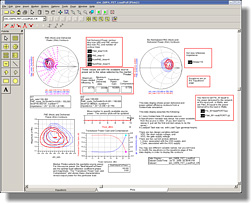
您可用多個游標、顏色、線條樣式和圖說來客製資料顯示圖表。 部分圖示可即時放大,而多個資料顯示視窗可存取同一個資料檔案,讓您能同時以多種方式查看資料。 您可選擇不同的顏色、符號或線條樣式來繪製掃描軌跡。
使用者可以啟動或不啟動單獨的圖示和方程式,以便僅模擬/量測和更新感興趣的量測結果和圖表,進而節省時間。 透過顯示工具列或按右鍵滑鼠,即可輕鬆選擇啟動或不啟動。
繪圖類型包括矩形(使用多個 x 軸和 y 軸)、極座標圖、史密斯圖(包括阻抗、導納、阻抗+導納)、疊層矩形(多個 y 軸覆蓋到一個 x 軸)以及清單欄。
軌跡類型包括直線、散點、長條圖、數字、頻譜和“匯流排軌跡”(用於顯示整個匯流排的二進位資料,寬度達 128 bit)。
繪圖和軌跡均可選擇線條粗細、顏色和線型。 繪圖可透過一系列圖形元素添加注釋,包括直線、矩形、圓圈、文本、多邊形和折線。