
검색 결과 페이지입니다. . 추천 검색 결과 보기:

Choose a country or area to see content specific to your location

    사이트 기능 및 성능 향상을 위해 브라우저 쿠키를 활성화하십시오.
    Keysight Technologies
    실기간 채팅
    키사이트에 연락
    Login Welcome Login
    환영합니다.
      다음 계정으로 로그인합니다:
    • 내 프로필
    • 로그아웃
    • 로그인
    • 등록하기
    한국

    국가 또는 지역 확인

    한국

    • 中国
    • 日本
    • 繁體中文
    • 한국
    • Brasil
    • Canada
    • Deutschland
    • France
    • India
    • Malaysia
    • United Kingdom
    • United States
    • Australia
    • Austria
    • Belgium
    • Denmark
    • Finland
    • Hong Kong, China
    • Ireland
    • Israel
    • Italy
    • Mexico
    • Netherlands
    • Singapore
    • Spain
    • Sweden
    • Switzerland (German)
    • Thailand
    • Vietnam
    • 모든 국가 또는 지역 보기 더 자세히

    확인해 주십시오.

    Confirm your country to access relevant pricing, special offers, events, and contact information.

        • Computer Aided Engineering right arrow
        • Electronic Design Automation right arrow
        • Engineering Data Management right arrow
        • Optical Design Engineering right arrow
        • Software Quality Engineering right arrow
        All Design Engineering Software right arrow
        • Oscilloscopes right arrow Sampling Oscilloscopes right arrow Digital Multimeters right arrow BERTS, Digitizers, and DAQs right arrow Digital Protocol Analyzers right arrow Waveform and Function Generators right arrow
        • Photonic and Optical Test right arrow Quantum Design and Test right arrow
        • AC Power Supplies right arrow DC Power Supplies right arrow DC Electronic Loads right arrow Power Analyzers right arrow Source Measure Units right arrow
        • LCR Meters and Impedance Analyzers right arrow Signal, Spectrum, and Wireless Analyzers right arrow Noise Figure and Phase Noise Analyzers right arrow Signal Sources right arrow RF Vector Transceivers right arrow Vector Network Analyzers right arrow RF Power Meters right arrow
        • Ethernet Traffic Emulation right arrow Network Emulators right arrow Interconnect Test right arrow
        • Channel Emulators right arrow UE, RAN, and Core Emulators right arrow Cellular Device Testing right arrow WLAN and IoT Testing right arrow
        • Automotive EV Emulators right arrow Autonomous Drive Testing right arrow Automotive Communications Testing right arrow
        • Security Attack Emulation right arrow Security Device Testing right arrow Vulnerability Assessment right arrow
      • All Instrument Software right arrow
        • Network Visibility Equipment right arrow
        • Network and Applications Monitoring right arrow
        • Semiconductors right arrow
        • In-Circuit Test For Manufacturing right arrow
        • Support Services right arrow
        • Managed Services right arrow
        • Financial Alternatives right arrow
        All Services right arrow
      • All Modular Instruments right arrow
        • Instrument Accessories right arrow
        • Part Number Lookup right arrow
      All Products right arrow
      Stream 120 MHz I/Q Data to Your Laptop in the Field

      Pinpoint interference with post-processing spectrum management software in the lab.

      Meet the New FieldFox
      Two FieldFox instruments
      Find the Right ATE Power Solution

      Use this selector tool to quickly identify the best power supply for your aerospace and defense ATE requirements.

      Start Now
      Aerospace and Defense ATE Power Selector
      3D Interconnect Designer

      3D Interconnect Designer provides a flexible modeling and optimization environment for any advanced interconnect structure, including chiplets, stacked die, packages, and PCBs.

      Explore Now
      Comprehensive design for advanced packages and 3DIC in any workflow
      Save up to 50% on an XR8 Oscilloscope

      Get faster digital validation for less with a trade-in.

      자세한 내용
      Pro XR8 Oscilloscope
      Discover Keysight AI Data Center Builder

      Emulate every part of your data center infrastructure. Emulate Anything. Optimize Everything.

      Explore Now
      Keysight PathWave VSA software running on a laptop
      Accelerate Signal Analysis with X-Series Measurement Applications

      Use 25+ X-Series applications to analyze, demodulate, and troubleshoot signals across wireless, aerospace/defense, EMI, and phase noise.

      Explore Now
      Keysight X-Series Measurement software running on a laptop
      Introducing AI-Enhanced Packet Brokers

      With extra memory and storage, these enhanced NPBs run Keysight's AI security and performance monitoring software and AI stack.

      Explore Now
      Vision 400 Network Packet Broker
      Precision In-Circuit Testing for Production

      Achieve fast, accurate board-level testing with robust inline and offline ICT designed for modern manufacturing.    

      Learn More
      Keysight's i3070 Series Equipment
      Accelerate Your Innovation Engine

      Explore curated support plans, prioritized to keep you innovating at speed.

      Explore KeysightCare
      Keysight Support
    • 솔루션
    • 리소스 살펴보기

      엔지니어가 작성한 콘텐츠와 교육 과정, 앱노트, 동영상 등 최신 기술에 대한 다양한 리소스를 제공합니다.

      Featured
      • nav icon 어플리케이션 노트
      • nav icon eBooks
      • nav icon 백서
      • nav icon 부트캠프
      리소스 검색 right arrow
      기타 학습 방법

      Keysight Learn은 솔루션, 블로그, 이벤트 등을 포함하여 관심 주제에 대한 몰입형 콘텐츠를 제공합니다.

      • nav icon 이용 사례
      • nav icon 학습하기 - Learning Hubs
      • nav icon 블로그
      • nav icon 이벤트
      Keysight Learn 살펴보기 right arrow
      • My Learn Dashboard
      • 키사이트 소개
      My Learn Dashboard

      Track. Discover. Personalize.
      All in one place.


      Try it today
    • 작업 지원

      가장 빈번하게 발생하는 작업 관련 셀프 도움말에 빠르게 액세스할 수 있습니다

      • 기술 지원
      • 지식 센터
      • 서비스 주문 관리
      • 교정 인증서
      • 소프트웨어 다운로드 센터
      도구

      제품 요구 사항을 지원하는 추가 콘텐츠

      • 키사이트 지원 포털
      • 컴퓨터 지원 엔지니어링(myESI)
      • 네트워크 테스트 및 가시성 지원
      • 신규 무선 솔루션 헬프 데스크
      • Eggplant Test 소프트웨어 지원
      • 소프트웨어 라이선스 관리자
      더 많은 키사이트 서비스 살펴보기

      혁신의 모든 단계를 가속화할 수 있는 서비스를 살펴보세요.

      자세히 보기
      • Computer Aided Engineering right arrow
        Electronic Design Automation right arrow
        Engineering Data Management right arrow
        Optical Design Engineering right arrow
        Software Quality Engineering right arrow
        All Design Engineering Software
        3D Interconnect Designer

        3D Interconnect Designer provides a flexible modeling and optimization environment for any advanced interconnect structure, including chiplets, stacked die, packages, and PCBs.

        Explore Now
        Comprehensive design for advanced packages and 3DIC in any workflow
      • Oscilloscopes right arrow Sampling Oscilloscopes right arrow Digital Multimeters right arrow BERTS, Digitizers, and DAQs right arrow Digital Protocol Analyzers right arrow Waveform and Function Generators right arrow
        Photonic and Optical Test right arrow Quantum Design and Test right arrow
        AC Power Supplies right arrow DC Power Supplies right arrow DC Electronic Loads right arrow Power Analyzers right arrow Source Measure Units right arrow
        LCR Meters and Impedance Analyzers right arrow Signal, Spectrum, and Wireless Analyzers right arrow Noise Figure and Phase Noise Analyzers right arrow Signal Sources right arrow RF Vector Transceivers right arrow Vector Network Analyzers right arrow RF Power Meters right arrow
        Save up to 50% on an XR8 Oscilloscope

        Get faster digital validation for less with a trade-in.

        자세한 내용
        Pro XR8 Oscilloscope
      • Ethernet Traffic Emulation right arrow Network Emulators right arrow Interconnect Test right arrow
        Channel Emulators right arrow UE, RAN, and Core Emulators right arrow Cellular Device Testing right arrow WLAN and IoT Testing right arrow
        Automotive EV Emulators right arrow Autonomous Drive Testing right arrow Automotive Communications Testing right arrow
        Security Attack Emulation right arrow Security Device Testing right arrow Vulnerability Assessment right arrow
        Discover Keysight AI Data Center Builder

        Emulate every part of your data center infrastructure. Emulate Anything. Optimize Everything.

        Explore Now
        Keysight PathWave VSA software running on a laptop
      • All Instrument Software
        Accelerate Signal Analysis with X-Series Measurement Applications

        Use 25+ X-Series applications to analyze, demodulate, and troubleshoot signals across wireless, aerospace/defense, EMI, and phase noise.

        Explore Now
        Keysight X-Series Measurement software running on a laptop
      • Network Visibility Equipment right arrow
        Network and Applications Monitoring right arrow
        Introducing AI-Enhanced Packet Brokers

        With extra memory and storage, these enhanced NPBs run Keysight's AI security and performance monitoring software and AI stack.

        Explore Now
        Vision 400 Network Packet Broker
      • Semiconductors right arrow
        In-Circuit Test For Manufacturing right arrow
        Precision In-Circuit Testing for Production

        Achieve fast, accurate board-level testing with robust inline and offline ICT designed for modern manufacturing.    

        Learn More
        Keysight's i3070 Series Equipment
      • Support Services right arrow
        Managed Services right arrow
        Financial Alternatives right arrow
        All Services
        Accelerate Your Innovation Engine

        Explore curated support plans, prioritized to keep you innovating at speed.

        Explore KeysightCare
        Keysight Support
      • All Modular Instruments
      • Instrument Accessories right arrow
        Part Number Lookup right arrow
      All Products
      Stream 120 MHz I/Q Data to Your Laptop in the Field

      Pinpoint interference with post-processing spectrum management software in the lab.

      Meet the New FieldFox
      Two FieldFox instruments
      Find the Right ATE Power Solution

      Use this selector tool to quickly identify the best power supply for your aerospace and defense ATE requirements.

      Start Now
      Aerospace and Defense ATE Power Selector
    • 솔루션
    • My Learn Dashboard right arrow

      엔지니어가 작성한 콘텐츠와 교육 과정, 앱노트, 동영상 등 최신 기술에 대한 다양한 리소스를 제공합니다.

      Featured
      • nav icon 어플리케이션 노트
      • nav icon eBooks
      • nav icon 백서
      • nav icon 부트캠프
      리소스 검색

      Keysight Learn은 솔루션, 블로그, 이벤트 등을 포함하여 관심 주제에 대한 몰입형 콘텐츠를 제공합니다.

      • nav icon 이용 사례
      • nav icon 학습하기 - Learning Hubs
      • nav icon 블로그
      • nav icon 이벤트
      Keysight Learn 살펴보기
      키사이트 소개 right arrow
      My Learn Dashboard

      Track. Discover. Personalize.
      All in one place.


      Try it today
    • 가장 빈번하게 발생하는 작업 관련 셀프 도움말에 빠르게 액세스할 수 있습니다

      • 기술 지원
      • 지식 센터
      • 서비스 주문 관리
      • 교정 인증서
      • 소프트웨어 다운로드 센터

      제품 요구 사항을 지원하는 추가 콘텐츠

      • 키사이트 지원 포털
      • 컴퓨터 지원 엔지니어링(myESI)
      • 네트워크 테스트 및 가시성 지원
      • 신규 무선 솔루션 헬프 데스크
      • Eggplant Test 소프트웨어 지원
      • 소프트웨어 라이선스 관리자
      더 많은 키사이트 서비스 살펴보기

      혁신의 모든 단계를 가속화할 수 있는 서비스를 살펴보세요.

      자세히 보기
    키사이트에 연락
    환영합니다. |
    Exit Procurement Session
    • View and Transfer Cart
    • Discard Cart and End Procurement Session
    • 키사이트.홈(Home)
    • Products and Services
    • ...
    • Electronic Design Automation
    • System Design (SystemVue)
    • W1719EP SystemVue RF System Design Kit [단종]

    무엇을 찾고 있습니까?

    Pro Oscilloscopes Handheld Spectrum Analyzers Compact Signal Generators 솔루션 기술지원 교육 이벤트 프리미엄 중고 장비 KeysightCare
    추천 검색어
    No product matches found - System Exception
    일치하는 컨텐츠

    W1719EP SystemVue RF System Design Kit

    제품상태
    단종
    단종
    Technical Support
    기술 지원
    pdf 데이터 시트 다운로드
    Prev
    대체
    W4502E RF Simulation
    제품 상세정보 보기
    |
    구매 또는 대여 옵션
    Next
    • 개요 및 특징
    • 구매 후 업그레이드
    • 리소스

    HIGHLIGHTS

    • Spectrasys – A spectral domain RF System Architecture simulator that offers compelling simulation and interactive graphical use model advantages over circuit tools, math-based block sets for time-domain simulators, vendor “calculator” apps, and spreadsheets. Choose from dozens of pre-programmed measurements and interact directly with graphs.
    • RF Link – A fast, automated dataflow modeling tool that allows system-level Dataflow simulations to use frequency-domain Spectrasys block diagrams directly, without modification. Account for multiple stages of up & down-conversion, spectral inversion, multiple I/O ports, baseband or modulated carrier ports, thermal and phase noise spectral densities, as well as frequency and power-dependence within the band.
    • ADS X-parameter* support – Use circuit-level nonlinear X-parameters at the system-level, for fast, bottom-up verification of ADS designs or measured devices from vendors. Accounts for complex impedance loading, harmonics, bias, power and frequency dependence. Enable the new Volterra modeling to make 1-tone X-parameter data more accurate for multi-tone large-signal simulations.
    • GoldenGate “Fast Circuit-Envelope” models – Verify Wireless SoC/RFIC transceivers up to 1,000-100,000 faster at the system level than with Spice, accounting for frequency translation, frequency and power dependence, and memory effects. Fast enough to run coded LTE BER/Throughput simulations or demodulate live on a Keysight 89600B VSA.
    • WhatIF – An RF Frequency Planning utility for multi-band, wireless front-ends.

    SystemVue ESL Design SoftwareThe W1719 RF System Design Kit provides an innovative simulator and Use Model for RF system architects, as well as Baseband and PHY-level designers who interact with RF circuits and systems. The W1719 is an option to the SystemVue environment that bridges design flow gaps for two groups of designers:

    • RF System Architects: The W1719 helps create better RF systems, lowers project risk, and saves time and prototyping costs by quickly diagnosing RF/Analog effects that are difficult or impossible to characterize with spreadsheets and other analysis techniques. As an RF architecture tool, it also closes the verification loop by connecting implementation-based models from Advanced Design System (ADS) and GoldenGate to Baseband algorithms, Reference IP, and test equipment, for superior RF-DSP partitioning and model-based verification.
    • Baseband Algorithm and System-level PHY Architects: The W1719 provides an easy-to-use RF design flow bridge that is accurate, fast, and doesn’t compromise the versatility of SystemVue as a multi-language modeling environment. It enables baseband and system-level designers to take advantage of the accuracy of models based on real transistor-level implementations, but without needing full RF domain knowledge, tools, and licenses. They can simply use the RF models with confidence in the dataflow domain, and exchange results with colleagues across disciplines using a common toolset.

    The W1719 provides the RF accuracy, troubleshooting diagnostics, and lightning fast modeling links from enterprise RF design flows required by system architects need to reduce excess design margins for today’s challenging wireless and defense systems, without introducing additional project risk. It is essential for physical layer systems requiring high linearity, wide bandwidth, and deep algorithmic complexity.

    The W1719 now brings RF modulation effects inside the RF system architecture tool

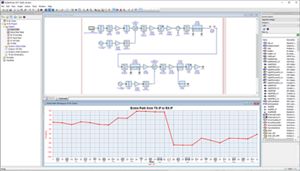
    Figure 1. The W1719 now brings RF modulation effects inside the RF system architecture tool, allowing wideband comms designers to identify sources of errors, such as nonlinearity, phase noise, and filter flatness.

    SystemVue W1719 RF System Design Kit

    Figure 2. The W1719 brings fast nonlinear X-parameters (ADS) and Fast Circuit Envelope models (GoldenGate) into the dataflow environment, for system-level verification of the full physical layer, including baseband algorithms.

    SystemVue W1719 RF System Design Kit Flow

    Figure 3. The W1719 RF System Design Kit is an optional add-on to SystemVue that enables deeper insights and RF design flow connectivity than would be possible using only a dataflow simulator.

    Spectrasys – Block-level RF simulator for RF Architects

    RF System Design Kit saves time for RF system architects by accounting for analog effects while providing one-click graphical diagnosis of RF system performance. Key to this is the Spectrasys simulator.

    Spectrasys overcomes key limitations of spreadsheets, math and DSP engines, circuit simulators, and their limited model sets, which miss these analog effects entirely, or make problems very difficult to isolate and diagnose. This enables RF system designers to identify and correct poor architecture choices early in the design, before commitments are made to the frequency plan, board area, layout, bill of materials, and performance.

    With more than 100 pre-defined system measurements, and dozens of power and voltage-based behavioral models, designers do not need to spend time writing homegrown code, when they can use a dedicated, graphical tool designed for the RF system design task. High-quality designs can be produced quickly, saving prototyping cycles, costly troubleshooting, and project risk.

    SystemVue W1719 RF System Design Kit Figure 4. Spectrasys accounts for complex mismatch, bi-directional propagation, nonlinearities, frequency response, leakage terms, continuous spectrums from DC to millimeter waves, and tracks individual signal and noise contributors. These can be inspected interactively in seconds, directly from the graphs.

    WhatIF – RF Frequency Planner

    The W1719 also provides the “WhatIF” frequency planning tool. WhatIF helps wireless system architects choose a set of Intermediate Frequencies (IFs) that maximize system performance with a minimum of filtering and design margin for multi-band RF receivers. It reduces the frequency planning task from weeks of analysis down to an afternoon using an interactive, graphical approach. It accounts for tuned bandwidths, spurs and intermodulated frequencies.

    W1719 Image

    Figure 5. The WhatIF frequency planning tool quickly shows the best choices of IF frequencies for best spur-free performance and with lower system complexity.

    Comparison with Genesys Spectrasys

    Of the capabilities of the W1719, the basic Spectrasys simulator and WhatIF utility are also available as options to the Keysight Genesys environment. If you primarily design analog/RF circuits, are able to approximate performance using CW tones, or have a low percentage of signal processing content, you may want to look at the Genesys versions of Spectrasys and WhatIF. Genesys configurations can be found in the Genesys Product Structure and Options Summary.

    If your communications or defense systems contain both RF and signal processing content, require modulation analysis, such as EVM, BER, spectral regrowth, or phased array beamforming, or you need to connect to test equipment, wireless standards references, or interactive baseband modeling, then W1719 RF System Design Kit within SystemVue is the clear choice.

    Configurations

    The W1719 RF System Design Kit can be added to any SystemVue Environment.

    The W1719 is already included in these bundles:

    • W1464 SystemVue RF System Architect
    • W1465 SystemVue System Architect
    • W1467 SystemVue Array Architect

    Many power amplifier designers interested in this product will also be interested in the W1716 SystemVue Digital Pre-Distortion Builder.

    정렬 기준 :
    날짜
    날짜 제목
    Filter Results
    이 제품에 대한 정보를 찾을 수 없습니다.
    다시 작성
    분야별 검색결과
    Back to Top

    탐색

    • 제품 + 서비스
    • 이용 사례
    • 솔루션
    • 키사이트 학습
    • 중고 장비
    • 파트너

    Support

    • 키사이트 제품 지원
    • 소프트웨어 라이센스 관리
    • 제품 주문 상태
    • 부품

    키사이트 정보

    • 뉴스룸
    • 투자자 정보
    • 품질 및 보안
    • 사회적 책임
    • 공급망 투명성
    • 취업 정보

    FOLLOW US

    • Facebook: Connect with Keysight
    • LinkedIn: Connect with Keysight
    • Twitter: Connect with Keysight
    • YouTube: Connect with Keysight
    • WeChat:Connect with Keysight
    • © 키사이트테크놀로지스 연혁 2000년–2026년
    • 개인정보 보호정책
    • 사이트맵
    • 이용 약관
    • 상표 승인
    • 피드백
    • Accessibility Statement