What are you looking for?
Keysight Oscilloscope Mobile
Keysight Oscilloscope Mobile is a FREE mobile app that lets you view and control your Keysight oscilloscope from your mobile device. Oscilloscope Mobile is the result of an investigation by Keysight's Measurement Research Laboratory.
- See below for install instructions, and for frequently asked questions, see: Keysight Oscilloscope Mobile FAQ
- View live waveforms and make measurements.
- Capture oscilloscope screen images onto your mobile device.
- Control oscilloscope functions including start/stop/single acquisition, autoscale, time/div, volts/div, turn channels on/off, and select trigger type/level/source.
- Supports up to 4 analog channels.
- Supports InfiniiVision 2000/3000/4000/6000 X-Series, 3000T X-Series, 5000/6000/7000 Series, Infiniium 9000 Series, and Infiniium S-Series oscilloscopes.
- Provides oscilloscope simulation mode.
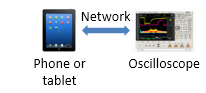
You can either connect directly to the oscilloscope:
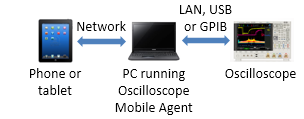
or connect to the oscilloscope through a PC running Keysight Oscilloscope Mobile Agent (which can be downloaded and installed from this page, below):
Technical Support
To report bugs, ask questions or give us your feedback, please email: scopemobile_support@keysight.com
| Data de lançamento | Versão | Descrição da Versão |
|---|---|---|
| 2015-03-06 | 1.5 | Fix handling of probe attenuation. Add support for 3000T X-Series and 5000 Series oscilloscopes. |
| Data de lançamento | Versão |
|---|---|
| 2015-03-06 | 1.5 |
| Version Description |
|---|
| Fix handling of probe attenuation. Add support for 3000T X-Series and 5000 Series oscilloscopes. |
Como Baixar
To download Keysight Oscilloscope Mobile Agent, click the Download button and save the installer.
Como Instalar
How To Connect Directly to an Oscilloscope
- On your mobile device, install Oscilloscope Mobile from the Apple App Store or Google Play
- Start Oscilloscope Mobile and tap Connect to Scope
- For the Choose Connection setting, tap Direct
- Enter the IP Address or hostname of your oscilloscope and tap Connect
How To Connect to an Oscilloscope Through a PC
- On your mobile device, install Oscilloscope Mobile from the Apple App Store or Google Play
- On your Windows PC, install Keysight Oscilloscope Mobile Agent from this page
- Start Oscilloscope Mobile Agent on your PC and connect to your oscilloscope.
- Start Oscilloscope Mobile on your mobile device and tap Connect to Scope
- For the Choose Connection setting, tap Via PC
-
Enter the IP Address or hostname of your PC and tap Connect
Licenciamento
- Does Not Require a License
Installs on: PC
Sistema Operacional
- Windows 8
- Windows 7
- Windows XP
Pré-requisitos
Instrumentos Compatíveis
- InfiniiVision 2000/3000/4000/6000 X-Series, 3000T X-Series, 5000/6000/7000 Series, Infiniium 9000 Series, and Infiniium S-Series oscilloscopes