Learn More
segmentation:campaign/Digital_General_Purpose,segmentation:product-category/DMMs_DAQs_Function_Generators,segmentation:product-category/DMMs_DAQs_Function_Generators/Function_Generators,segmentation:business-unit/EISG,keysight:product-lines/gm,segmentation:funnel/bofu,keysight:dtx/solutions/facets/industry/semiconductor,keysight:dtx/solutions/facets/development-area/high-speed-digital,keysight:dtx/solutions/facets/workflow-stage/design,keysight:dtx/solutions/facets/design-and-test-product/waveform-and-function-generators,keysight:models/33/33622asegmentation:campaign/Digital_General_Purpose,segmentation:product-category/DMMs_DAQs_Function_Generators,segmentation:product-category/DMMs_DAQs_Function_Generators/Function_Generators,segmentation:business-unit/EISG,keysight:product-lines/gm,segmentation:funnel/bofu,keysight:dtx/solutions/facets/industry/semiconductor,keysight:dtx/solutions/facets/development-area/high-speed-digital,keysight:dtx/solutions/facets/workflow-stage/design,keysight:dtx/solutions/facets/design-and-test-product/waveform-and-function-generators,keysight:models/33/33622asegmentation:campaign/Digital_General_Purpose,segmentation:product-category/DMMs_DAQs_Function_Generators,segmentation:product-category/DMMs_DAQs_Function_Generators/Function_Generators,segmentation:business-unit/EISG,keysight:product-lines/gm,segmentation:funnel/bofu,keysight:dtx/solutions/facets/industry/semiconductor,keysight:dtx/solutions/facets/development-area/high-speed-digital,keysight:dtx/solutions/facets/workflow-stage/design,keysight:dtx/solutions/facets/design-and-test-product/waveform-and-function-generators,keysight:models/33/33622asegmentation:campaign/Digital_General_Purpose,segmentation:product-category/DMMs_DAQs_Function_Generators,segmentation:product-category/DMMs_DAQs_Function_Generators/Function_Generators,segmentation:business-unit/EISG,keysight:product-lines/gm,segmentation:funnel/bofu,keysight:dtx/solutions/facets/industry/semiconductor,keysight:dtx/solutions/facets/development-area/high-speed-digital,keysight:dtx/solutions/facets/workflow-stage/design,keysight:dtx/solutions/facets/design-and-test-product/waveform-and-function-generators,keysight:models/33/33622asegmentation:campaign/Digital_General_Purpose,segmentation:product-category/DMMs_DAQs_Function_Generators,segmentation:product-category/DMMs_DAQs_Function_Generators/Function_Generators,segmentation:business-unit/EISG,keysight:product-lines/gm,segmentation:funnel/bofu,keysight:dtx/solutions/facets/industry/semiconductor,keysight:dtx/solutions/facets/development-area/high-speed-digital,keysight:dtx/solutions/facets/workflow-stage/design,keysight:dtx/solutions/facets/design-and-test-product/waveform-and-function-generators,keysight:models/33/33622asegmentation:campaign/Digital_General_Purpose,segmentation:product-category/DMMs_DAQs_Function_Generators,segmentation:product-category/DMMs_DAQs_Function_Generators/Function_Generators,segmentation:business-unit/EISG,keysight:product-lines/gm,segmentation:funnel/bofu,keysight:dtx/solutions/facets/industry/semiconductor,keysight:dtx/solutions/facets/development-area/high-speed-digital,keysight:dtx/solutions/facets/workflow-stage/design,keysight:dtx/solutions/facets/design-and-test-product/waveform-and-function-generators,keysight:models/33/33622asegmentation:campaign/Digital_General_Purpose,segmentation:product-category/DMMs_DAQs_Function_Generators,segmentation:product-category/DMMs_DAQs_Function_Generators/Function_Generators,segmentation:business-unit/EISG,keysight:product-lines/gm,segmentation:funnel/bofu,keysight:dtx/solutions/facets/industry/semiconductor,keysight:dtx/solutions/facets/development-area/high-speed-digital,keysight:dtx/solutions/facets/workflow-stage/design,keysight:dtx/solutions/facets/design-and-test-product/waveform-and-function-generators,keysight:models/33/33622asegmentation:campaign/Digital_General_Purpose,segmentation:product-category/DMMs_DAQs_Function_Generators,segmentation:product-category/DMMs_DAQs_Function_Generators/Function_Generators,segmentation:business-unit/EISG,keysight:product-lines/gm,segmentation:funnel/bofu,keysight:dtx/solutions/facets/industry/semiconductor,keysight:dtx/solutions/facets/development-area/high-speed-digital,keysight:dtx/solutions/facets/workflow-stage/design,keysight:dtx/solutions/facets/design-and-test-product/waveform-and-function-generators,keysight:models/33/33622asegmentation:campaign/Digital_General_Purpose,segmentation:product-category/DMMs_DAQs_Function_Generators,segmentation:product-category/DMMs_DAQs_Function_Generators/Function_Generators,segmentation:business-unit/EISG,keysight:product-lines/gm,segmentation:funnel/bofu,keysight:dtx/solutions/facets/industry/semiconductor,keysight:dtx/solutions/facets/development-area/high-speed-digital,keysight:dtx/solutions/facets/workflow-stage/design,keysight:dtx/solutions/facets/design-and-test-product/waveform-and-function-generators,keysight:models/33/33622asegmentation:campaign/Digital_General_Purpose,segmentation:product-category/DMMs_DAQs_Function_Generators,segmentation:product-category/DMMs_DAQs_Function_Generators/Function_Generators,segmentation:business-unit/EISG,keysight:product-lines/gm,segmentation:funnel/bofu,keysight:dtx/solutions/facets/industry/semiconductor,keysight:dtx/solutions/facets/development-area/high-speed-digital,keysight:dtx/solutions/facets/workflow-stage/design,keysight:dtx/solutions/facets/design-and-test-product/waveform-and-function-generators,keysight:models/33/33622asegmentation:campaign/Digital_General_Purpose,segmentation:product-category/DMMs_DAQs_Function_Generators,segmentation:product-category/DMMs_DAQs_Function_Generators/Function_Generators,segmentation:business-unit/EISG,keysight:product-lines/gm,segmentation:funnel/bofu,keysight:dtx/solutions/facets/industry/semiconductor,keysight:dtx/solutions/facets/development-area/high-speed-digital,keysight:dtx/solutions/facets/workflow-stage/design,keysight:dtx/solutions/facets/design-and-test-product/waveform-and-function-generators,keysight:models/33/33622a
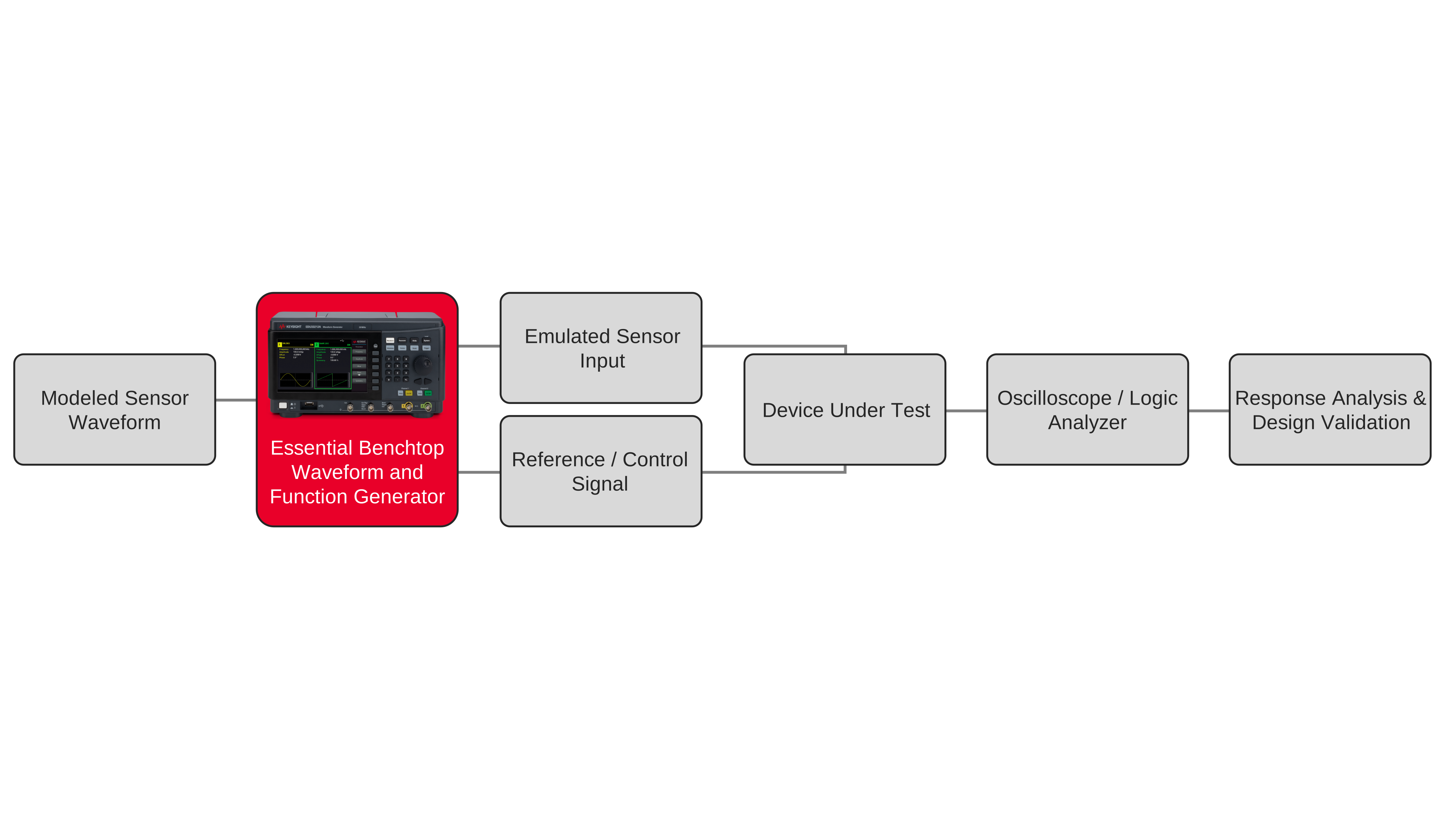
How to Modify Arbitrary Waveforms for Device Simulation
Use arbitrary waveform generation and waveform editing to recreate device stimulus while preserving timing, transitions, and critical signal detail.
Learn More