Können wir Ihnen behilflich sein?
W1468BP SystemVue Spectrasys Bundle



- Überblick und Leistungsmerkmale
- Upgrades nach dem Kauf
- Ressourcen
HIGHLIGHTS
- Spectrasys – A spectral domain RF System Architecture simulator that offers compelling simulation and interactive graphical use model advantages over circuit tools, math-based block sets for time-domain simulators, vendor “calculator” apps, and spreadsheets. Choose from dozens of pre-programmed measurements and interact directly with graphs.
- ADS X-parameter* support – Use circuit-level nonlinear X-parameters at the system-level, for fast, bottom-up verification of ADS designs or measured devices from vendors. Accounts for complex impedance loading, harmonics, bias, power and frequency dependence. Enable the new Volterra modeling to make 1-tone X-parameter data more accurate for multi-tone large-signal simulations.
- WhatIF – An RF Frequency Planning utility for multi-band, wireless front-ends.

The SystemVue Spectrasys Bundle enables you to efficiently design optimal RF system architectures. Its interactive system frequency planning (WhatIF) capabilities cut tedious calculation of mixing frequencies in the RF system from hours to minutes. And, innovative root cause analysis in the Spectrasys system simulator identifies the origins of problematic spurious signals before critical commitments are made to architectures, frequencies, and component partitioning to prevent costly hardware integration delays downstream.
Why you need SystemVue Spectrasys Bundle
- SystemVue Spectrasys Bundle provides dedicated design and diagnostic tools for the RF system architect to realize high performance RF systems with the optimal frequency planning and partitioning of system component specs.
- Unique root cause analysis in the Spectrays system simulator diagnoses sources of RF analog impairments such as spurious frequency mixing and impedance mismatches that are ignored by spreadsheets or DSP/math tools.
- Integration of system and linear circuit simulator allows system architects and circuit designers to perform interactive design tradeoffs before critical commitments are made to architectures, frequencies, and component specs to prevent costly hardware integration delays downstream.
- Over 100 pre-defined system measurements with appropriate power and voltage-based behavioral models, replace homegrown code with a dedicated, RF system design graphical tool. This is especially useful for generating professional looking proposals with accurate and realistic RF system performance simulations to profitably win defense aerospace contracts.
What Can I Design with SystemVue Spectrasys Bundle?
- RF upconverter and downconverter architectures
- Communication signal paths of all kinds: transceivers, detectors, monitors
- Satellite links, and terrestrial microwave links
- Commercial, wireless, and military communication links
- Medical, RFID, and proprietary data links that re-deploy commercial chipsets for novel applications
- Multi-band Receiver architectures, and Image-rejection and interference rejection systems
- Voltage-based systems, such as an RFIC downconverter
-
Who should use SystemVue Spectrasys Bundle?
Is this your situation? Benefit of SystemVue Spectrasys Bundle Team of RF system architect and circuit designers who need to realize an RF system Integration of system and linear circuit simulators enable system architects and circuit designers to perform interactive design tradeoffs before critical commitments are made to architectures, frequencies, and component specs to prevent costly hardware integration delays downstream. RF system designers who rely on spreadsheets Get superior diagnostic insights such as origins of spurious frequency mixing and impedance mismatches missed by spreadsheets before making critical commitments to system architectures, frequencies, and component specs partitioning to prevent costly hardware integration delays downstream. RF system designers who rely on math engines or time-domain DSP simulators Use SystemVue to design the optimal raw, uncorrected analog RF hardware. Standalone DSP and math engines do not accurately account for RF system effects such as spurious frequency mixing and impedance mismatches which are needed before making critical commitments to system architectures, frequencies, and component specs partitioning to prevent costly hardware integration delays downstream. To simulate the effects of DSP-based correction algorithms on RF performance, the SystemVue Spectrasys bundle can be upgraded to a full SystemVue configuration that include the time-domain Dataflow engine. Users of Keysight Advanced Design System (ADS) as well as other major EDA platforms Provides superior RF system architecture design capabilities than equivalent in-platform tools and at a lower price. Integrates with the ADS design flow. Proposal writers, system architects, as well as creators of test & repair plans Get realistic and valuable system insights quickly without significant NRE or IP creation, and then follow through into implementation, verification, or professional documentation. A proposal not only contains professional looking and realistic simulation but also the full confidence that the system can be profitably delivered on time.
Spectrasys – Block-level RF simulator for RF Architects
RF System Design Kit saves time for RF system architects by accounting for analog effects while providing one-click graphical diagnosis of RF system performance. Key to this is the Spectrasys simulator.
Spectrasys overcomes key limitations of spreadsheets, math and DSP engines, circuit simulators, and their limited model sets, which miss these analog effects entirely, or make problems very difficult to isolate and diagnose. This enables RF system designers to identify and correct poor architecture choices early in the design, before commitments are made to the frequency plan, board area, layout, bill of materials, and performance.
With more than 100 pre-defined system measurements, and dozens of power and voltage-based behavioral models, designers do not need to spend time writing homegrown code, when they can use a dedicated, graphical tool designed for the RF system design task. High-quality designs can be produced quickly, saving prototyping cycles, costly troubleshooting, and project risk.

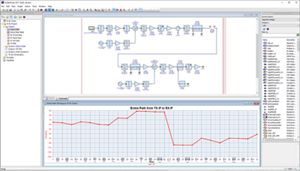
Figure 1. Spectrasys accounts for complex mismatch, bi-directional propagation, nonlinearities, frequency response, leakage terms, continuous spectrums from DC to millimeter waves, and tracks individual signal and noise contributors. These can be inspected interactively in seconds, directly from the graphs.
WhatIF – RF Frequency Planner
The W1468 also provides the “WhatIF” frequency planning tool. WhatIF helps wireless system architects choose a set of Intermediate Frequencies (IFs) that maximize system performance with a minimum of filtering and design margin for multi-band RF receivers. It reduces the frequency planning task from weeks of analysis down to an afternoon using an interactive, graphical approach. It accounts for tuned bandwidths, spurs and intermodulated frequencies.
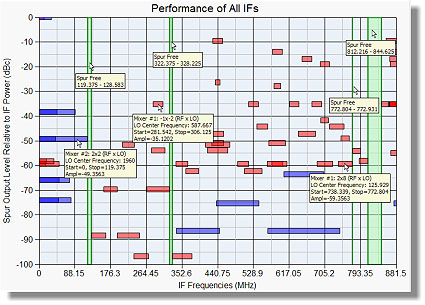
Figure 2. The WhatIF frequency planning tool quickly shows the best choices of IF frequencies for best spur-free performance and with lower system complexity.
Comparison with Genesys Spectrasys
Of the capabilities of the W1468, the basic Spectrasys simulator and WhatIF utility are also available as options to the Keysight Genesys environment. If you primarily design analog/RF circuits, are able to approximate performance using CW tones, or have a low percentage of signal processing content, you may want to look at the Genesys versions of Spectrasys and WhatIF. Genesys configurations can be found in the Genesys Product Structure and Options Summary.
If your communications or defense systems contain both RF and signal processing content, require modulation analysis, such as EVM, BER, spectral regrowth, or phased array beamforming, or you need to connect to test equipment, wireless standards references, or interactive baseband modeling, then the SystemVue Spectrasys bundle can be upgraded to a full SystemVue configuration that include the time-domain Dataflow engine.
Configuration
Click the Options & Accessories tab above to learn more about the products listed below.
What is included with SystemVue Spectrasys Bundle?
- SystemVue core schematic environment
- W1719 RF System Design Kit (includes Spectrasys, WhatIF)
- Not included: time-domain Dataflow simulator (can be added with W1461)
To view all SystemVue configurations, refer to the SystemVue Product Structure & Options Summary.