What are you looking for?
What Is Automotive Interior Lighting?
Definition of Automotive Interior Lighting
Automotive interior lighting is lighting inside of a car that provides comfort and safety for the driver and passengers. It includes:
- Instrument panels
- Infotainment display
- Satellite navigation
- Multimedia displays
- Glovebox light
- Mirror lighting
- Overhead lighting on passenger side
- Car door illumination/puddle light
- Overhead lighting
- Storage lights
- Reading lights, back seat lights
- Trunk light
- Registration plate light


Table of Contents
How Is Automotive Interior Lighting Helpful?
Broadly, automotive interior lighting falls into three categories:
- Displays and indicators
- Illumination
- Accent lighting
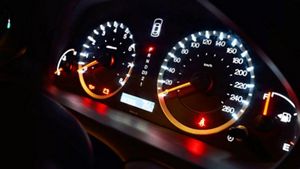


The driver uses displays and indicators to obtain information, from standard dashboard instrumentation information to more complex navigation system information, a menu-driven display, or a multimedia device. For display and indicator lighting, the key metrics are color, luminance, and luminance uniformity.
Interior illumination systems provide light that enables drivers and passengers to see controls, displays, and interior features. These systems include dome lights, mirror lights to illuminate a face, map and reading lamps, storage lights, and more. The key metrics illumination systems, are the geometry of the illuminated area, illuminance levels, and uniformity. Color can also be a factor for visibility issues and for custom “mood” lighting.
The primary purposes of accent lighting are to provide styling, create a desired ambience, and to make various controls visible in a darkened cabin — from power window controls and radio knobs to other features, such as cup holders and charging ports. Accent lighting generally has a much lower intensity than interior illumination, as its purpose is to enhance visibility rather than illuminate cabin objects. The main design concerns with this type of lighting are color, visual uniformity, and appropriate light levels.


How Do You Design a Dome Light?
Unlike specifications for exterior automotive lighting, which come from a government agency, specifications for interior lighting often come directly from the manufacturer — General Motors, Toyota, Volkswagen, or Hyundai, for example. For a dome lamp, the specifications might include the color of the light and a set of illuminance test points specified in lumens per square meter, or lux, that you measure with a lux meter.
Figure 1 shows a circular light guide designed for an automotive dome light using the Light Guide Designer in LightTools. The LightTools Optimization Module was used to control the size, shape, and placement of prism textures in the light guide that direct the light from the light source to the target area for the best results.


Figure 1. Circular light guide dome lamp designed using the LightTools Light Guide Designer tool.
How Do You Design Lighting for a Speedometer?
The design of something like an illuminated needle for a speedometer may seem simple, but to do it well the designer must carefully craft the needed elements, which is much easier with the right design tool.
Typically, items in an instrument cluster such as the speedometer, shift panel (PRNDL), temperature controls, and radio controls have manufacturer test point specifications for luminance (the illumination metric most closely associated with brightness) as well as color (u',v' or x,y color coordinates).
Often, the numbers or the needles will have several spread out test points that a quality engineer measures in a dark room with a spectral photometer (or radiometer), which is also called a spot meter.


Usually, the needle is wider at the bottom than it is at the top. A well-engineered needle will have uniform spatial appearance (luminance) along the length. This can be particularly challenging to design because you need a non-linear extraction of light along the needle to achieve the uniform light distribution.
Fortunately, LightTools helps at each design challenge you may face in this type of system. The design process may go something like this:
- Get the specifications – This might be a set of test points, the face of the speedometer as an appliqué, and some or all of the needle geometry. For this example, the goal is to have the white letters be approximately 10 nits (lumens per steradian per meter-squared).
- Design the backlight – In this example, shown in Figure 2 below, the backlight has an LED providing light at its top edge. Tools such as the Backlight Pattern Optimizer (BPO) in LightTools help you to find the best pattern or optimize the 3D textures to let the light emit uniformly from the backlight toward the driver. The appliqué, placed in front of the backlight, creates the desired pattern.


Figure 2. Model with full backlight.
Design the light sources, base, and fold mirror for the needle.
- First, make sure you can get light from the source (often an LED mounted on a flat circuit board) into the needle. You can accomplish this by using the “stalk” of the speedometer knob as a light guide so light gets to the top of the structure.
- At the top of the circular section, you can use a carefully designed notch — a total internal reflection (TIR) fold mirror — to turn the light by 90 degrees, as shown on the left in the image below.
- To find the best angle for the fold mirror, you can use the LightTools Parameter Analyzer feature.
- You can also use the Parameter Analyzer to study how much the light reaching the needle will change as the needle turns around. In the example below, results showed that the design worked much better with two LED sources.


Figure 3. Designing with one or two LED sources.
Design light extractors for the needle.
- You need to extract light guided into the needle and direct it toward the driver's eye.
- There are several ways to accomplish this — using a pattern of textures or paint dots, for example. LightTools has several tools for designing and optimizing the pattern, such as the Backlight Pattern Optimizer and the Light Guide Designer, or you can adjust the pattern by hand or with the Parameter Analyzer.
- This example shows a white paint stripe pattern applied on the underside of the needle and optimized it so that the light the driver sees is spatially uniform.


Figure 4. Design light extractors for the needle.
The final design below is a true color plot approximating what the driver will see.


What Solution Does Keysight Offer?
For designing vehicle interior lighting, LightTools illumination design software from Keysight provides a complete set of design, simulation, and analysis tools for designing superior automotive optical designs.


Explore related blogs





Want help or have questions?