


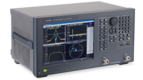

Title
S11
Tech Guide
Phased Array Testing at the Element Level: An RF Bench Guide to the E5071C

Introduction
RF phased array testing at the element level comes down to 3 bench decisions: port count, frequency coverage, and calibration reference plane. You need repeatable channel phase before the next build, but much of what you find under “phased array testing” is array theory or ultrasonic weld inspection. The calibration reference plane is the decision that can write a bench error into every correction table you ship. This guide maps all 3 decisions to configurations of the certified used Keysight E5071C ENA vector network analyzer.
The numbers below come from the Keysight E5071C data sheet 5989-5479EN and Keysight application notes.
Overview
- RF phased array testing at the element level is multi-port S-parameter measurement on a calibrated bench: S11 per element, S21 amplitude and phase per channel, and coupling between elements.
- The E5071C-2K5 covers 300 kHz to 20 GHz on 2 ports with bias tees, the 4K5 offers 4 ports over that range, and the 480 offers 4 ports from 9 kHz to 8.5 GHz.
- Keysight specifies phase trace noise for the 2K5 and 4K5 from 0.035 deg rms (10 MHz to 4.38 GHz) to 0.165 deg rms (17 to 20 GHz) at a 70 kHz IF bandwidth (IFBW).
- The Official Keysight Used Equipment Store sells the E5071C certified used, with savings across the store of up to 90% for Keysight Used and up to 70% for Keysight Premium Used, and up to 5 years warranty options.
Already know your band and port count? Request a quote on an E5071C configured for it.
What Is RF Phased Array Testing, and How Does It Differ from Ultrasonic Phased Array Testing?
RF phased array testing measures each element and channel in amplitude and phase so the array's correction tables can steer the beam where the design intends. Element-level work means conducted S-parameter measurement on a network analysis bench: return loss per element, gain and phase per channel, and coupling between neighbors.
The same name also covers phased array ultrasonic testing (PAUT), a non-destructive testing method that steers ultrasound through welds and metal to find flaws. The two share the physics of phased excitation, but little else on the bench. This guide stays with RF fundamentals and RF phased arrays.
RF array test runs at 3 levels:
- Element and channel level: conducted S-parameters on a network analyzer bench, covered in this guide.
- Subarray or panel level: multiport or switched measurements, also covered here.
- Full-array radiated level: near-field or far-field range measurements, the step after the bench.
The work moves from bench to range: element data come from a calibrated analyzer, and steer-angle checks follow over the air.
What Does Element-Level Phased Array Testing Measure?
Element-level testing reduces to 4 measurements: element return loss, channel gain and phase, mutual coupling, and state tables.
| Measurement | S-parameter | Ports at once | What it feeds |
|---|---|---|---|
| Element return loss | S11 | 1 | Element acceptance limit, fixture check |
| Channel gain and phase | S21 | 2 | Per-channel amplitude and phase correction table |
| Mutual coupling | Sij between element ports | 2 per pair (4 for neighbors at once) | Coupling model, active match check |
| Phase-shifter and attenuator states | S21 per state | 2 | State tables (64 phase states for 6 bits) |
Measurement
S-parameter
Ports at once
What it feeds
Element return loss
Title
1
1
Title
Element acceptance limit, fixture check
Element acceptance limit, fixture check
Channel gain and phase
Title
S21
S21
Title
2
2
Title
Per-channel amplitude and phase correction table
Per-channel amplitude and phase correction table
Mutual coupling
Title
Sij between element ports
Sij between element ports
Title
2 per pair (4 for neighbors at once)
2 per pair (4 for neighbors at once)
Title
Coupling model, active match check
Coupling model, active match check
Phase-shifter and attenuator states
Title
S21 per state
S21 per state
Title
2
2
Title
State tables (64 phase states for 6 bits)
State tables (64 phase states for 6 bits)
Element Return Loss (S11)
S11 describes the match each element presents to its channel. S11 is a 1-port measurement, and the VSWR and return loss calculator converts between VSWR and return loss when a limit is written as VSWR. Fixture reflections can move S11 between runs, which the gating section addresses.
Channel Gain and Phase (S21)
S21 amplitude and phase through each beamforming channel feed the per-channel correction table. Beam steering depends on relative phase between channels, so the analyzer's phase repeatability has to stay well below the smallest phase step the array uses.
Mutual Coupling Between Elements
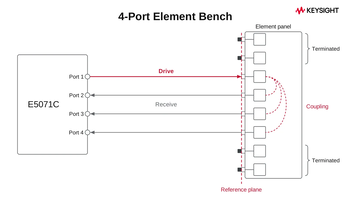
Coupling is S21 between 2 element ports with the remaining ports terminated, and a 2-port bench measures it one pair at a time. A 2025 paper from Chalmers University of Technology reports that verifying each element's active reflection coefficient typically requires extensive S-parameter data that accounts for the mutual couplings between ports. How much the terminations on unmeasured elements shift a pairwise result depends on the array, so this guide cannot give a single number for it. Resolve that for your own design before you choose between sequential 2-port work and a 4-port configuration.
Phase-Shifter and Attenuator State Tables
Each channel is swept at every phase and attenuator state. A 6-bit phase shifter has 64 states, with 5.625 deg steps (360/64) of phase shift, so a 256-element panel already means 16,384 sweeps before attenuator states.
How Many Network Analyzer Ports Does an Element-Level Bench Need?
A typical panel has far more elements than the analyzer has ports. Port count determines what one connection measures.
On the E5071C-2K5, every 4-port job becomes sequential 2-port measurements, with one channel or element pair per connection. The 4K5 or 480 can measure a channel and its neighbors in one connection. The vector network analyzer glossary defines the multiport terms, and the entry on what a network analyzer measures covers ports and receivers.
| Bench | E5071C option | Ports | Range | One connection measures | Typical use |
|---|---|---|---|---|---|
| 2-port | 2K5 | 2 | 300 kHz to 20 GHz | One channel or one element pair | Development bench |
| 4-port | 4K5 | 4 | 300 kHz to 20 GHz | A channel and its neighbors | Sub-panel, production |
| 4-port, lower band | 480 (485 with bias tees) | 4 | 9 kHz to 8.5 GHz (Type-N; 485 starts at 100 kHz) | Same as 4K5, to 8.5 GHz | L-band to C-band phased arrays |
| Switched | 4K5 with E5092A | More than 4 | 50 MHz to 20 GHz | One element port per switch state | Larger subarrays |
Bench
E5071C option
Ports
Range
One connection measures
Typical use
2-port
Title
2K5
2K5
Title
2
2
Title
300 kHz to 20 GHz
300 kHz to 20 GHz
Title
One channel or one element pair
One channel or one element pair
Title
Development bench
Development bench
4-port
Title
4K5
4K5
Title
4
4
Title
300 kHz to 20 GHz
300 kHz to 20 GHz
Title
A channel and its neighbors
A channel and its neighbors
Title
Sub-panel, production
Sub-panel, production
4-port, lower band
Title
480 (485 with bias tees)
480 (485 with bias tees)
Title
4
4
Title
9 kHz to 8.5 GHz (Type-N; 485 starts at 100 kHz)
9 kHz to 8.5 GHz (Type-N; 485 starts at 100 kHz)
Title
Same as 4K5, to 8.5 GHz
Same as 4K5, to 8.5 GHz
Title
L-band to C-band phased arrays
L-band to C-band phased arrays
Switched
Title
4K5 with E5092A
4K5 with E5092A
Title
More than 4
More than 4
Title
50 MHz to 20 GHz
50 MHz to 20 GHz
Title
One element port per switch state
One element port per switch state
Title
Larger subarrays
Larger subarrays
Past 4 ports, the E5092A configurable multiport test set switches more element ports onto a 4-port E5071C, such as the 4K5, from 50 MHz to 20 GHz. Keysight's data sheet lists E5092A Option 020 insertion loss per switch of up to 11.5 dB for SPDT and 12 dB for SP4T at 18 to 20 GHz, with selected-port load match of 4 dB from 10 to 20 GHz. That is why calibration is done through the switch path. Per-switch stability is 0.008 dB/°C from 12 to 20 GHz, listed as supplemental performance data (SPD) at 23 °C ±3 °C. Drift across a long switched run can show up in the results.
Not sure whether your array needs 2 ports or 4? Browse the certified used inventory and request a quote.
How Repeatable Does Each Phase Measurement Need to Be?
From 10 MHz to 4.38 GHz, the 2K5 and 4K5 are specified at 0.035 deg rms. Phase trace noise is the analyzer's random sweep-to-sweep contribution. It does not include drift or post-calibration uncertainty. Keysight's E5071C data sheet lists phase trace noise for Options 2D5, 2K5, 4D5, and 4K5 at 70 kHz IFBW and maximum output power of the sweep range. The value rises by band.
| Band (data sheet segment) | Phase trace noise (deg rms) | Magnitude trace noise (dB rms) | Share of a 5.625 deg step |
|---|---|---|---|
| 10 MHz to 4.38 GHz | 0.035 | 0.004 | 0.6% |
| 4.38 to 8.5 GHz | 0.050 | 0.006 | 0.9% |
| 8.5 to 13.137 GHz | 0.064 | 0.009 | 1.1% |
| 13.137 to 17 GHz | 0.095 | 0.013 | 1.7% |
| 17 to 20 GHz | 0.165 | 0.023 | 2.9% |
Band (data sheet segment)
Phase trace noise (deg rms)
Magnitude trace noise (dB rms)
Share of a 5.625 deg step
10 MHz to 4.38 GHz
Title
0.035
0.035
Title
0.004
0.004
Title
0.6%
0.6%
4.38 to 8.5 GHz
Title
0.050
0.050
Title
0.006
0.006
Title
0.9%
0.9%
8.5 to 13.137 GHz
Title
0.064
0.064
Title
0.009
0.009
Title
1.1%
1.1%
13.137 to 17 GHz
Title
0.095
0.095
Title
0.013
0.013
Title
1.7%
1.7%
17 to 20 GHz
Title
0.165
0.165
Title
0.023
0.023
Title
2.9%
2.9%
Every trace-noise value in the table is under 3% of a 6-bit phase step. Narrowing the IFBW lowers trace noise further at the cost of sweep time.
On many element benches, the analyzer is a smaller term in the error budget than the setup around it. Cable flexure, connector repeatability, temperature drift, and calibration can contribute more than the analyzer does. The data sheet's corrected performance assumes less than 1 °C deviation from the calibration temperature.
Which E5071C Configuration Fits Your Array Band?
The starting configuration for an element bench is the Keysight E5071C-2K5, with 2 ports, 300 kHz to 20 GHz coverage, bias tees, and 3.5 mm male test ports. Across its options, the E5071C covers 9 kHz to 20 GHz on 2 or 4 ports. The store sells the certified used E5071C ENA, and each unit's installed options are confirmed on its listing.
| Spec (data sheet 5989-5479EN) | E5071C-2K5 | E5071C-4K5 | E5071C-480 |
|---|---|---|---|
| Ports | 2 | 4 | 4 |
| Frequency range | 300 kHz to 20 GHz | 300 kHz to 20 GHz | 9 kHz to 8.5 GHz |
| Bias tees | Yes | Yes | No |
| Test port connector | 3.5 mm (male) | 3.5 mm (male) | Type-N (female) |
| System dynamic range, 10 Hz IFBW (specification) | 123 dB (100 MHz to 6 GHz), 100 dB (10.5 to 15 GHz), 96 dB (15 to 20 GHz) | Same as 2K5 | See data sheet Table 1 |
| IF bandwidth and points | 10 Hz to 1.5 MHz, 2 to 20,001 points | Same | Same |
| Interfaces | LAN, USB, GPIB (SCPI) | Same | Same |
Spec (data sheet 5989-5479EN)
E5071C-2K5
E5071C-4K5
E5071C-480
Ports
Title
2
2
Title
4
4
Title
4
4
Frequency range
Title
300 kHz to 20 GHz
300 kHz to 20 GHz
Title
300 kHz to 20 GHz
300 kHz to 20 GHz
Title
9 kHz to 8.5 GHz
9 kHz to 8.5 GHz
Bias tees
Title
Yes
Yes
Title
Yes
Yes
Title
No
No
Test port connector
Title
3.5 mm (male)
3.5 mm (male)
Title
3.5 mm (male)
3.5 mm (male)
Title
Type-N (female)
Type-N (female)
System dynamic range, 10 Hz IFBW (specification)
Title
123 dB (100 MHz to 6 GHz), 100 dB (10.5 to 15 GHz), 96 dB (15 to 20 GHz)
123 dB (100 MHz to 6 GHz), 100 dB (10.5 to 15 GHz), 96 dB (15 to 20 GHz)
Title
Same as 2K5
Same as 2K5
Title
See data sheet Table 1
See data sheet Table 1
IF bandwidth and points
Title
10 Hz to 1.5 MHz, 2 to 20,001 points
10 Hz to 1.5 MHz, 2 to 20,001 points
Title
Same
Same
Title
Same
Same
Interfaces
Title
LAN, USB, GPIB (SCPI)
LAN, USB, GPIB (SCPI)
Title
Same
Same
Title
Same
Same
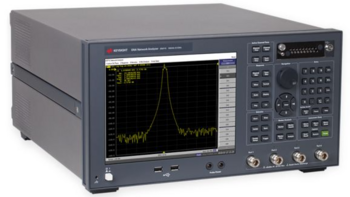
On the 2K5 and 4K5, bias tees feed DC through the test ports to active evaluation boards. Keysight lists a maximum bias tee input voltage of ±35 VDC and a maximum current of ±200 mA with no degradation in RF specifications. Fit depends on your fixture and supply needs.
Option 010 time domain is required for gating element return loss, and Option 008 frequency offset mode supports channels that convert frequency.
By the band letters the European Space Agency uses, Ku-band spans 12 to 18 GHz and Ka-band 26 to 40 GHz. Ku-band satcom testing therefore sits inside the 2K5 and 4K5 range. The 20 GHz ceiling leaves Ka-band and mmWave phased arrays for a higher-frequency Keysight analyzer, such as an E5080B ENA option that covers the band.
| Array band | Range (ESA band letters) | E5071C fit | Note |
|---|---|---|---|
| L, S, C | 1 to 8 GHz | 480, 2K5, 4K5 | 480 for Type-N fixtures (485 adds bias tees) |
| X | 8 to 12 GHz | 2D5 or 4D5, 2K5, 4K5 | 480 stops at 8.5 GHz |
| Ku | 12 to 18 GHz | 2K5, 4K5 | 2D5 and 4D5 stop at 14 GHz |
| Ka | 26 to 40 GHz | Above the E5071C | E5080B class |
Array band
Range (ESA band letters)
E5071C fit
Note
L, S, C
Title
1 to 8 GHz
1 to 8 GHz
Title
480, 2K5, 4K5
480, 2K5, 4K5
Title
480 for Type-N fixtures (485 adds bias tees)
480 for Type-N fixtures (485 adds bias tees)
X
Title
8 to 12 GHz
8 to 12 GHz
Title
2D5 or 4D5, 2K5, 4K5
2D5 or 4D5, 2K5, 4K5
Title
480 stops at 8.5 GHz
480 stops at 8.5 GHz
Ku
Title
12 to 18 GHz
12 to 18 GHz
Title
2K5, 4K5
2K5, 4K5
Title
2D5 and 4D5 stop at 14 GHz
2D5 and 4D5 stop at 14 GHz
Ka
Title
26 to 40 GHz
26 to 40 GHz
Title
Above the E5071C
Above the E5071C
Title
E5080B class
E5080B class
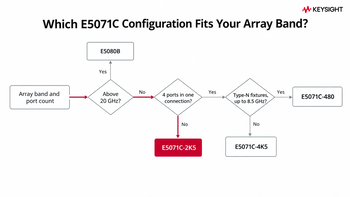
Keysight's page on reasons to buy the E5071C used versus new sets out the cost case. For the configuration, request one of these:
- Development bench, up to Ku-band, one channel at a time: E5071C-2K5.
- 4 channels at once, relative phase without reconnects, or a production station: E5071C-4K5.
- Type-N fixtures, 4 ports, up to 8.5 GHz: E5071C-480, for example, or the E5071C-485 when bias tees are needed.
- Above 20 GHz: an E5080B option that covers the band.
Browse the certified used inventory and request a quote on an E5071C configured for your band.
Why Does Calibration Decide Element-to-Element Repeatability?
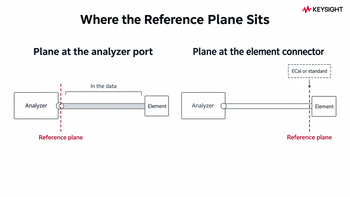
The third decision is the calibration reference plane: where it sits on your fixture. It also includes whether the calibration module you plan to use is listed by Keysight as supported for the E5071C. A plane left at the analyzer port puts cable and fixture variation into the data, then into every correction table built on that data.
Two common paths set the reference plane on a 2K5 or 4K5. A mechanical 3.5 mm SOLT kit connects short, open, load, and thru standards in sequence. Electronic calibration (ECal) replaces that sequence with one module. Keysight's ECal technical overview 5963-3743E (March 2025) lists which ECal modules each analyzer supports and from which firmware revision.
For the E5071C, it lists the N4690D, N4691D, N4692D, and N4696D as supported from firmware B.14.03 over USB. The 3.5 mm N4691D matches the 3.5 mm test ports. Compatibility is model-specific, so check the table before ordering. The 2.4 mm N4693D, which reaches 50 GHz, and the N4694D are not listed for the E5071C, while the same table lists both for E5080B-class analyzers. Keysight states that a full calibration "can be accomplished with a single connection" to the module, which reduces the chance of operator error and the wear on connectors.
Analyzer calibration is separate from phased array antenna calibration, which builds the array's own per-element correction tables, often in situ. As of October 2026, IEEE P3582, a recommended practice for calibrating digital phased arrays, is an active project (PAR authorized March 27, 2025) rather than a published standard, so confirm its status before citing it in a test plan. Keysight calibration services cover the analyzer itself, and the calibration certificates guide explains what the certificate documents.
Before you calibrate an element bench, confirm these:
- Connector type and gender at the element fixture (3.5 mm on the 2K5 and 4K5 ports).
- Analyzer firmware revision (B.14.03 or later for N4691D support).
- Temperature stability within 1 °C of the planned calibration temperature.
- Reference plane location: at the element connector, not at the analyzer port.
- A verification standard measured after calibration and before element data is taken.
Check the store for current ECal module listings, and ask on the quote whether a supported 3.5 mm module is available alongside the analyzer.
How Do You Keep Fixture Reflections Out of Element Return Loss?
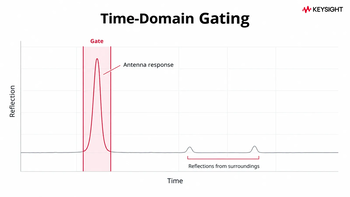
Element S11 that shifts when someone stands near the fixture typically points to reflections from nearby objects. Time-domain gating keeps the antenna's own response and drops reflections from its surroundings. Keysight Application Note 5989-9805 walks through gating on the 20 GHz E5071C. Option 010 time domain is required.The procedure:
- Set the measurement conditions, run a full 1-port calibration on the port, connect the element, and measure S11.
- Turn on the time-domain transform, choose low-pass impulse, and run Set Freq Low Pass. It changes the start frequency, so recalibrate.
- Set a bandpass gate around the element's reflection. The note's example uses a 1.7 ns center and a 1 ns span, which keeps the response within 150 mm of the antenna.
- Turn the transform off. The gate stays applied to the frequency-domain trace.
In the note's example, ripples caused by an operator's hand near the antenna disappear from the gated trace, and “a 2 3 dB peak margin can be obtained by removing ripples,” which allows smaller guard bands.
Gate center and span depend on fixture geometry and cable length, so set them from your own trace. The gate also leaves systematic error terms such as directivity to the calibration.
Need Option 010 on the unit? Confirm installed options on the listing, then browse the certified used E5071C and request a quote.
How Long Does It Take to Sweep Every Element and State?
A 256-element panel with 64 states needs 16,384 sweeps. At 12 ms each (11 to 12 GHz, 201 points, 500 kHz IFBW), that's 196.6 s, about 3.3 minutes of sweep time, with about 16 s of data transfer on top. A full 300 kHz to 20 GHz sweep takes 35 ms under the same conditions (Table 40), which makes about 9.6 minutes for 16,384 sweeps. Sweep time is the small part: reconnecting, switching, and settling can take longer, which is where the port-count choice comes back in.
Keysight's supplemental throughput data for the 2K5 and 4K5 lists 12 ms per cycle with 2-port calibration and 24 ms with 4-port calibration (data sheet 5989-5479EN, Table 40). Data transfer times are also supplemental (Table 46). Each row counts one sweep per element and state. Trace-noise values are specified at 70 kHz IFBW, while sweep times are specified at 500 kHz IFBW (Tables 21 and 40).
| Step | Count | Time per item (condition) | Subtotal |
|---|---|---|---|
| Sweeps, 2-port cal | 16,384 | 12 ms (11 to 12 GHz, 201 points, 500 kHz IFBW, stepped) | 196.6 s |
| Sweeps, 4-port cal (alternative) | 16,384 | 24 ms (same conditions) | 393.2 s |
| Data transfer | 16,384 | About 1 ms (201 points, 64-bit floating point, 1 Gbps LAN) | About 16 s |
| Full-span reference (2-port cal) | 1 | 35 ms (300 kHz to 20 GHz, 201 points, 500 kHz IFBW) | Not applicable |
Step
Count
Time per item (condition)
Subtotal
Sweeps, 2-port cal
Title
16,384
16,384
Title
12 ms (11 to 12 GHz, 201 points, 500 kHz IFBW, stepped)
12 ms (11 to 12 GHz, 201 points, 500 kHz IFBW, stepped)
Title
196.6 s
196.6 s
Sweeps, 4-port cal (alternative)
Title
16,384
16,384
Title
24 ms (same conditions)
24 ms (same conditions)
Title
393.2 s
393.2 s
Data transfer
Title
16,384
16,384
Title
About 1 ms (201 points, 64-bit floating point, 1 Gbps LAN)
About 1 ms (201 points, 64-bit floating point, 1 Gbps LAN)
Title
About 16 s
About 16 s
Full-span reference (2-port cal)
Title
1
1
Title
35 ms (300 kHz to 20 GHz, 201 points, 500 kHz IFBW)
35 ms (300 kHz to 20 GHz, 201 points, 500 kHz IFBW)
Title
Not applicable
Not applicable
Automation runs over SCPI on LAN, USB or GPIB, with a handler I/O port for production. Application Note 5989-9805 states that the 20 GHz ENA provides "the same user interface and programming commands" as the 4.5 GHz and 8.5 GHz options, so software written for those options can be leveraged on the 20 GHz unit.
What Does a Conducted Bench Leave to the Antenna Range?
A 2K5 or 4K5 bench covers element and channel S-parameters, state tables, coupling, and active-board checks with bias applied. Beam patterns, gain, and effective isotropic radiated power (EIRP) need a range. EIRP and over-the-air calibration are measured afterward in near-field or far-field setups, such as anechoic chambers and scanners.
A 2020 NIST study of a dual-beam 28 GHz phased-array channel sounder found that over-the-air corrections are steer-angle specific. Angle-specific pre-distortion filters achieved a peak-to-sidelobe ratio of up to 56.5 dB in the impulse response, and applying a filter designed for one steer angle to other angles degraded performance by up to 8.6 dB.
As of October 2026, IEEE lists IEEE Std 149-2021, the recommended practice for antenna measurements, as an active standard. Published in February 2022 as a revision of the 1977 edition, it covers test facility design, instrumentation, and range evaluation and operation. Confirm the applicable revision before writing a new range procedure.
For the step after the bench, see how to measure antenna gain using a network analyzer. The antenna gain calculator and the EIRP calculator help check range results against the link budget.
Is a Certified Used E5071C a Sound Basis for a Production Array Bench?
"The E5071C is end of life. Why build a new array bench on it?" Discontinued changes how you buy and support the analyzer, not how it measures. Keysight's data sheet gives May 31, 2021, as the last order date for the E5071C and recommends the E5080B for new purchases. The ECal technical overview, revised in March 2025, still lists ECal modules supported on the E5071C. Application Note 5989-9805, published December 5, 2017, explains that RF models of vector network analyzers "such as the E5071C ENA (4.5 GHz/8.5 GHz)" are widely used in the design process and on the production line to measure return loss or VSWR for commercial antennas.
A certified used E5071C is sold direct from Keysight and listed with its calibration status, so you know the analyzer's condition before you run your own bench calibration. Keysight Premium Used equipment is refurbished by Keysight and updated to the latest compatible firmware and software, with the same warranty as a new instrument; terms vary by model and region. Each unit goes through a performance verification and a final 101-point quality check. Warranty options run up to 5 years, and KeysightCare adds technical support.
For procurement, the useful document is one quote that states the calibration status, warranty options, and savings, which run across the store up to 90% for Keysight Used and up to 70% for Keysight Premium Used. Keysight reports that 78% of its customers lose more than $25,000 a day when equipment fails, so support terms belong on that quote. The network analyzer buying guide covers the wider category decision.
Browse the certified used inventory and request a quote.
Select up to 3 instruments to compare
Select another instrument to compare
![]()
Starting at
Select another instrument to compare
![]()
Starting at
Select another instrument to compare
![]()
Starting at
Frequently Asked Questions
The name covers two disciplines. In RF engineering, phased array testing measures the amplitude and phase of each antenna element and beamformer channel, usually as S-parameters on a calibrated network analyzer bench. Phased array ultrasonic testing (PAUT) is a separate non-destructive method for inspecting welds and metal.
Bench and range tests answer different questions. A conducted bench measures each element and channel through its connector. Over-the-air (OTA) testing measures the formed beam on a range across beam angles. IEEE Std 149-2021, published February 2022 and active as of October 2026, guides that range work.
On a network analyzer bench, 3 types cover most element work:
- Response: normalizes one path but leaves most systematic errors in
- 1-port: corrects reflection errors for element S11
- Full 2-port: corrects all 4 S-parameters for channel gain and phase
Note: the array's own correction tables are a separate step.
Several modules are supported on the E5071C. Keysight's ECal technical overview 5963-3743E lists the N4690D, N4691D, N4692D, and N4696D over USB from firmware B.14.03, and the 3.5 mm N4691D is one example that matches the 3.5 mm ports of the 2K5 and 4K5. The 2.4 mm N4693D is listed for E5080B-class analyzers, not the E5071C.
For element and channel S-parameters, 20 GHz covers Ku-band. By the band letters ESA uses, Ku-band spans 12 to 18 GHz, which sits inside the E5071C-2K5 and 4K5 range of 300 kHz to 20 GHz. Phase trace noise across that band is specified at 0.064 to 0.165 deg rms (70 kHz IFBW, maximum output power of the sweep range). Ka-band phased arrays need a higher-frequency analyzer.
Port count depends on what one connection must capture:
- 2 ports (E5071C-2K5, 300 kHz to 20 GHz): one channel or element pair
- 4 ports (E5071C-4K5 or 480): a channel and its neighbors
- More ports: E5092A configurable multiport test set with a 4-port analyzer, 50 MHz to 20 GHz
Note: pairwise coupling can shift with how unmeasured elements are terminated.
What Should a Quote Request for an Array Bench Specify?
A complete configuration line saves a round trip. Put these 9 items on the request:
- Array band and the E5071C option that covers it: 2K5, 4K5, or 480.
- Ports needed in one connection (2 or 4), or a switched E5092A setup on a 4-port unit.
- Option 010 time domain for gating element return loss.
- Calibration path: a 3.5 mm SOLT kit or a supported ECal module, such as the N4691D, if available with the unit.
- Firmware at B.14.03 or later, if the quote includes an N4691D.
- Bias needs for active boards, within the ±35 VDC maximum and ±200 mA maximum bias current.
- Option 008 frequency offset, if the path converts frequency.
- Calibration status and certificate needed on delivery.
- Warranty option and KeysightCare coverage.
Send it through the certified used network analyzers page. One decision remains design-specific: define how your array's unmeasured elements are terminated during coupling measurements before choosing between sequential 2-port work and 4 ports at once.
Whenever You’re Ready, Here Are
5 Ways We Can Help You
1
Browse our certified used network analyzers, including Keysight Premium Used equipment.
2
Call tech support US: +1 800 829-4444
Press #, then 2. Hours: 7am – 5pm MT, Mon– Fri
3
Contact our sales support team
4
Create an account to get price alerts and access to exclusive waitlists
5
Talk to your account manager about your specific needs
Sources
- Keysight, E5071C ENA Vector Network Analyzer Data Sheet, 5989-5479EN, April 2, 2020: options, dynamic range, trace noise (Table 21), connectors, bias tees (Table 32), cycle ti
- Keysight, Electronic Calibration (ECal) Modules for Vector Network Analyzers, Technical Overview 5963-3743E, March 27, 2025: analyzer compatibility list and single-con
- Keysight, UWB Antenna Measurements with the 20 GHz E5071C ENA Network Analyzer, Application Note 5989-9805, December 5, 2017: gating procedure, peak margin, programming
- IEEE, IEEE Std 149-2021, IEEE Recommended Practice for Antenna Measurements, published February 18, 2022, active as of October 2026.
- Walt Kester, MT-001: SNR = 6.02N + 1.76 dB, Analog DevicesIEEE, P3582, Recommended Practice for Calibration of Digital Phased Arrays, active project, PAR authorized March 27, 2025.
- Jun, Caudill, Senic, Gentile, Chuang and Golmie (NIST), Over-The-Air Calibration of a Dual-Beam Dual-Polarized 28-GHz Phased-Array Cha
- J. Yang (Chalmers University of Technology), A Simple Measurement Method for Estimation of Active Reflection Coefficient for Large Planar Array Antennas, IEEE APCAP 2025.
- Keysight, E5071C Help: Frequency Offset Measurement, Overview: Option 008 frequency offset mode.
- European Space Agency, Satellite Frequency Bands, accessed October 8, 2026.