


Title
Define project power requirements
Buying Guides
Complete Variable Power Supply Buying Guide For Engineers

Introduction
When you’re deep into a test setup, the last thing you want is a power supply that drifts, adds noise, or can’t keep up with programmable demands. In R&D labs and production lines alike, the stability of your supply often determines whether your measurements are trustworthy or misleading.
Choosing the right variable power supply can be tricky. Voltage and current requirements, accuracy, protections, and cost all compete for attention. The wrong choice risks device damage or wasted lab time, while the right one delivers reliable, repeatable results.
A solid understanding of variable power supplies ensures accurate experiments, reduces risk, and supports automation. This guide will show you how to define requirements, compare specifications, troubleshoot issues, and apply advanced features to your own projects.
If you’re exploring cost-effective, OEM-certified options, the Keysight Used Equipment Store is a trusted place to begin.
Understanding Variable Power Supplies and Their Role in Testing
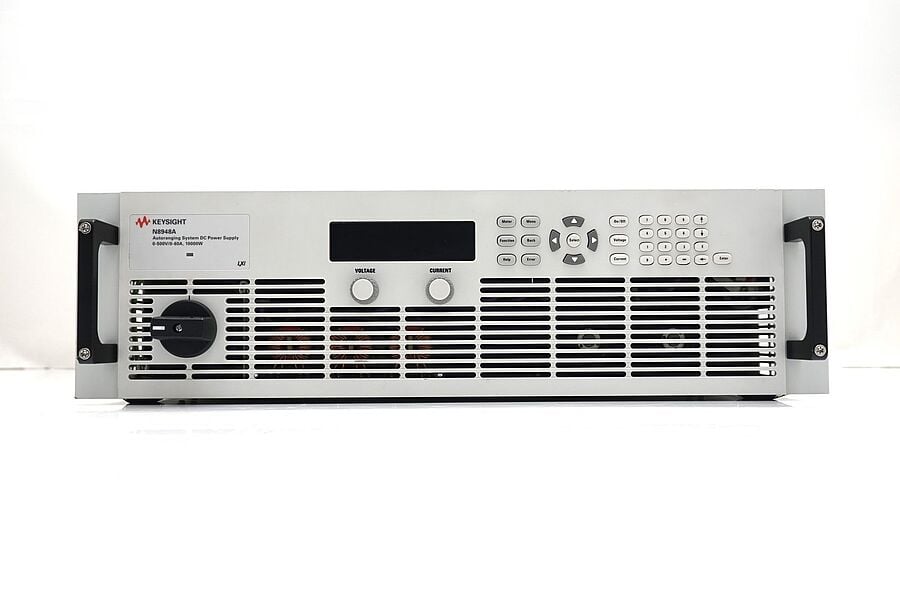
A variable power supply is a device that lets you adjust voltage and current to match the exact needs of your circuit or system under test. Unlike fixed-output supplies, variable models give you the flexibility to fine-tune output for different projects and components.
At their core, most units include four main elements:
- Transformer: converts incoming AC line voltage into a level suitable for rectification.
- Rectifier: changes AC into DC, which electronic devices require for proper operation.
- Regulator: stabilizes the output voltage, ensuring fluctuations from the mains don’t affect your test.
- Control panel: the user interface, often digital today, that lets you set and monitor voltage, current, and other parameters.
In a lab or production setting, stability and precision are not optional. A small drift in voltage can alter test results, leading to design flaws that only surface later in the product lifecycle. Ripple and noise on the output can also mask or mimic circuit behavior, making troubleshooting more difficult. Reliable power supplies directly impact both test accuracy and final product quality, reducing the risk of costly redesigns or field failures.
A few misconceptions are worth clearing up. First, not all power supplies deliver the same stability. Two models with the same voltage and current range may perform very differently in practice. Second, programmability isn’t only for automated factories. It simplifies repetitive lab testing and improves consistency across teams. And finally, the lowest purchase price doesn’t always equal the best value. Factoring in long-term reliability, calibration, and service support often makes a higher-quality supply more cost-effective.
Before diving deeper into specifications, it helps to have a basic understanding of voltage, current, and the difference between AC and DC. You should also consider the typical needs of your test environment. Whether you’re powering small prototype boards, characterizing automotive subsystems, or running stress tests on consumer devices. For an overview of power supply fundamentals, see the Introduction to Bench Power Supplies.
Step-by-Step Selection and Usage Guide
Selecting a variable power supply is less about finding a “one-size-fits-all” model and more about matching the supply to your project’s needs and the realities of your lab. The process can feel complex at first, but breaking it down into defined steps helps you choose with confidence. Each step requires a different level of effort, from quick spec checks to detailed evaluations.
Overview of Steps
| Step | Focus Area | Complexity |
|---|---|---|
| 1 | Define project power requirements | Medium |
| 2 | Evaluate output accuracy and stability | High |
| 3 | Understand programmability and interface options | Medium |
| 4 | Factor in safety features and protections | Medium |
| 5 | Assess size, portability, and noise | Low |
| 6 | Check quality, warranty, support, and calibration | Medium |
| 7 | Make a purchase decision | High |
Step
Focus Area
Complexity
1
Title
Medium
Medium
2
Title
Evaluate output accuracy and stability
Evaluate output accuracy and stability
Title
High
High
3
Title
Understand programmability and interface options
Understand programmability and interface options
Title
Medium
Medium
4
Title
Factor in safety features and protections
Factor in safety features and protections
Title
Medium
Medium
5
Title
Assess size, portability, and noise
Assess size, portability, and noise
Title
Low
Low
6
Title
Check quality, warranty, support, and calibration
Check quality, warranty, support, and calibration
Title
Medium
Medium
7
Title
Make a purchase decision
Make a purchase decision
Title
High
High
Step 1: Define Project Power Requirements
Start by identifying the maximum voltage your device under test (DUT) needs. Then calculate the highest expected current, including transient spikes that may occur during startup or under stress conditions. Engineers often underestimate current tolerances, which can cause unstable tests or device failures.
Consider future scalability as well. A project that only needs 30 V today might require 60 V next year. Document your findings in a detailed checklist covering voltage, current, and transient requirements. This becomes your baseline when comparing models.
Step 2: Evaluate Output Accuracy and Stability
Accuracy and stability are central to meaningful test results. Voltage accuracy, resolution, and long-term drift all matter, especially when working with precision electronics. Ripple and noise levels are equally critical. Supplies with low ripple (often in the millivolt range) prevent false readings and protect sensitive circuits.
To illustrate, compare waveforms of a supply with high ripple versus one with tightly regulated output. The difference can decide whether a circuit appears stable or unstable under load. For high-performance testing, always prioritize supplies with published low-ripple specifications.
Linear supplies typically offer cleaner outputs with less noise, while switching supplies are more efficient and compact but may introduce higher ripple.
Step 3: Understand Programmability and Interface Options
Programmability turns a power supply from a passive tool into an active part of automated workflows. Common control protocols include SCPI, USB, and LAN. SCPI in particular is widely used for lab automation and allows precise scripting of voltage and current profiles.
Programmable interfaces improve repeatability and reduce operator error. Match the supply’s interface with your lab’s existing control software to avoid integration headaches. Also review vendor support, look for API documentation, driver availability, and software updates that keep your supply compatible with evolving systems.
For a deeper dive, see SCPI Programming Basics.
Step 4: Factor in Safety Features and Protections
Safety is as important as performance. A quality supply includes overvoltage, overcurrent, and thermal overload protection. These safeguards prevent damage to both your DUT and the power supply itself.
Choose based on the sensitivity of your application. Short-circuit protection is especially valuable for experimental setups, where mistakes in wiring or sudden failures can occur.
Step 5: Assess Size, Portability, and Noise
Physical footprint and electromagnetic noise generation often get overlooked. In crowded labs, a compact supply can save space, while portability matters for mobile test stations. Switching supplies can generate electromagnetic noise, so be mindful of interference with other sensitive instruments.
Choose models with good shielding and grounding, especially when working in environments with multiple instruments running simultaneously.
Step 6: Check Quality, Warranty, Support, and Calibration Services
The quality of a supply extends beyond hardware. Factory calibration ensures outputs meet specifications from day one. A strong warranty and extended service options reduce long-term risk. Transparency about recalibration intervals and costs is equally important. Unplanned recalibration downtime can disrupt projects.
To evaluate service providers, review this guide on Keysight Calibration Services.
Step 7: Make a Purchase Decision
With all the data in hand, compare models not just on specs but also on supplier reliability. Consider whether new or refurbished equipment best fits your budget and timeline. Refurbished, OEM-certified supplies often include warranties and calibration at a fraction of the cost of new units.
If you have existing equipment, trade-in programs can offset acquisition costs while upgrading your lab with higher-performance supplies.
Troubleshooting Common Issues
Even well-designed power supplies can run into problems during demanding lab work. Knowing how to identify and resolve these issues quickly keeps your projects moving forward.
Voltage Instability and Fluctuation
When output voltage drifts or fluctuates:
- Check that all cables are secure and properly rated for the current.
- Confirm the device under test is not exceeding the supply’s limits.
- Run a quick calibration check if available.
If instability persists, the regulator or other internal components may be failing. At that point, professional servicing is the safest solution
Unexpected Shutdowns
Sudden shutdowns often result from thermal overloads or current protection trips.
- Inspect airflow and clean dust from vents and fans to prevent overheating.
- Measure the actual current draw of your device and verify it is within the supply’s limits.
- If shutdowns happen under normal load, sensors or protection circuits may require inspection by the manufacturer.
Interface Communication Errors
In automated test environments, communication errors can stall progress.
- Update firmware and drivers to the latest versions. Check that cables are intact and connections are reliable.
- Verify command syntax if using SCPI or similar protocols.
If errors persist even with correct settings, test the setup with another instrument to rule out conflicts
Preventive Maintenance
Many issues can be avoided with routine care:
- Schedule regular calibration to keep outputs accurate.
- Keep units free of dust and moisture.
- Maintain logs of error events to spot recurring patterns early.
When to Seek Professional Support
Self-service checks are useful, but professional support is best when:
- Calibration fails or drift continues despite adjustments.
- Shutdowns persist under normal conditions.
- Communication errors remain unresolved after updates.
Budget limits often restrict the scope of testing, but Keysight’s calibrated, warranty-backed refurbished units help overcome those limits, providing high performance without compromise.
Quick Troubleshooting Reference
| Issue | Likely Cause | Quick Fix |
|---|---|---|
| Output voltage instability | Loose connections, overloaded supply, regulator drift | Check cables, confirm load within limits, run calibration |
| Unexpected shutdowns | Thermal overload or current trip | Clean vents/fans, measure load current, verify operating within limits |
| Interface communication errors | Outdated firmware, driver mismatch, cable fault | Update firmware/drivers, test cables, confirm protocol settings |
| Persistent drift or failure | Internal component wear | Seek professional servicing or calibration support |
Issue
Likely Cause
Quick Fix
Output voltage instability
Title
Loose connections, overloaded supply, regulator drift
Loose connections, overloaded supply, regulator drift
Title
Check cables, confirm load within limits, run calibration
Check cables, confirm load within limits, run calibration
Unexpected shutdowns
Title
Thermal overload or current trip
Thermal overload or current trip
Title
Clean vents/fans, measure load current, verify operating within limits
Clean vents/fans, measure load current, verify operating within limits
Interface communication errors
Title
Outdated firmware, driver mismatch, cable fault
Outdated firmware, driver mismatch, cable fault
Title
Update firmware/drivers, test cables, confirm protocol settings
Update firmware/drivers, test cables, confirm protocol settings
Persistent drift or failure
Title
Internal component wear
Internal component wear
Title
Seek professional servicing or calibration support
Seek professional servicing or calibration support
By keeping this reference nearby, engineers can quickly match issues with solutions, saving valuable lab time and ensuring tests stay on track.
Advanced Tips and Customizations
Once the basics are in place, engineers often look for ways to push their power supplies further. Advanced configurations can help streamline complex projects, support automation, and adapt to specialized testing needs.
Multi-Channel Setups
For projects requiring multiple voltages or parallel testing, multi-channel power supplies reduce clutter and improve coordination. Instead of juggling several single-channel units, a multi-channel system lets you synchronize outputs, track performance centrally, and simplify your wiring. This is particularly useful in semiconductor device testing and automotive subsystem validation.
Modular Add-Ons
Some labs benefit from modular designs that allow add-ons such as additional output modules or higher-capacity channels. Modular systems grow with your projects, making them ideal for long-term R&D where requirements can change quickly. They also save space by consolidating functionality into one platform.
Firmware and Software Tweaks
Custom firmware or vendor-provided software can unlock additional control features. Engineers frequently tailor automation scripts to adjust ramp rates, simulate transient conditions, or run stress tests without manual intervention. Reviewing available APIs and scripting options before purchase ensures that the supply can adapt to future demands.
For engineers exploring deeper automation, this overview of Advanced Lab Automation Techniques highlights strategies that can further enhance how power supplies integrate into larger test setups.

Real-World Applications and Case Studies
Variable power supplies play a central role across industries, where precision and reliability translate directly into better outcomes. Seeing how different sectors use these tools offers practical insight into their value.
Telecommunications
In telecom labs, stable multi-channel supplies are used to validate base stations, routers, and signal amplifiers. A supply with low ripple ensures measurements are not distorted by noise, which is critical for evaluating signal integrity. Teams that upgraded to programmable supplies reported shorter test cycles and fewer repeated runs, improving ROI by reducing wasted engineering hours.
Aerospace
Aerospace projects demand rigorous testing under simulated flight conditions. Engineers often rely on programmable profiles to mimic fluctuating in-flight voltages.
In one case, a lab achieved greater test reliability by replacing several standalone units with a modular, multi-channel system, cutting both setup time and error rates. The result was faster certification testing and significant cost savings.
Automotive
Automotive engineers face high current demands when testing drivetrain systems and EV components. Supplies with strong overload protection prevent costly damage during stress tests.
A leading automotive lab reported fewer equipment failures and higher throughput after adopting supplies with advanced safety features, proving that protection directly impacts productivity.
Semiconductor
Semiconductor R&D requires precise, low-noise outputs for device characterization. A semiconductor team using calibrated, OEM-certified refurbished supplies achieved measurement accuracy comparable to new equipment but at lower cost. This allowed the lab to scale up testing capacity within the same budget, accelerating time to market.
Lessons Learned
Across industries, the takeaway is clear: investing in reliable, programmable, and properly calibrated power supplies reduces errors, protects devices, and speeds up development. Whether in telecom, aerospace, automotive, or semiconductors, the right supply translates into measurable improvements in both accuracy and return on investment.
Additional Tools and Learning Resources
Getting the most out of a variable power supply often goes beyond the instrument itself. Accessories, training, and community knowledge can help you work more efficiently and solve challenges faster.
Accessories such as high-quality cables, connectors, and breakout leads are essential for maintaining clean signals and accurate measurements. Software add-ons also expand functionality, from automated data logging to advanced remote control.
For engineers who want to go deeper, training and certification programs provide structured learning in power supply operation, automation scripting, and calibration practices. These courses not only improve technical expertise but also support consistent workflows across teams.
Peer-to-peer knowledge is another valuable resource. Active technical forums like the EEPower Forums, Eng-Tips Power Supply Design Forum, and the Electrical Engineering Stack Exchange give you access to discussions and solutions from other engineers facing similar test and measurement challenges.
By combining the right accessories, ongoing training, and participation in these engineering communities, you can extend the life and performance of your equipment while staying current with evolving best practices.
Conclusion
Variable power supplies may seem like straightforward instruments, but their impact on testing accuracy, device safety, and lab efficiency is significant. The right supply provides stable outputs, integrates smoothly into automated workflows, and includes the protections and calibration services that keep your work reliable over time.
This guide walked through how to define project requirements, compare accuracy and stability, evaluate programmability, and factor in safety, size, and service. It also covered troubleshooting tips, advanced customizations, and real-world case studies across industries. With this knowledge, you’re better equipped to make informed decisions that align with both technical goals and budget realities.
As a practical next step, review your lab’s current and future testing needs. Build a specification checklist, compare models from trusted suppliers, and consider the long-term value of warranty-backed, calibrated equipment. Don’t hesitate to consult with technical experts if you’re unsure which option fits best. Every hour saved in setup and troubleshooting is time invested back into innovation.
Explore Keysight’s power supply products along with premium used test equipment such as oscilloscopes, network analyzers, and multimeters to find solutions that combine performance with value.
Whenever You’re Ready, Here Are
5 Ways We Can Help You
1
2
Call tech support US: +1 800 829-4444
Press #, then 2. Hours: 7am – 5pm MT, Mon– Fri
3
Contact our sales support team
4
Create an account to get price alerts and access to exclusive waitlists
5
Talk to your account manager about your specific needs.
Frequently Asked Questions
Start with the maximum requirements of your device under test, including transient spikes. Always select a supply with headroom above your peak values so it can handle unexpected loads without instability.
Frequent issues include underestimating current demand, overlooking ripple and noise specifications, and forgetting to enable safety limits. Using low-quality cables is another common oversight that can distort results.
Annual calibration is standard for most labs, though high-precision environments may require shorter intervals. Following manufacturer guidelines ensures the supply’s readings remain trustworthy. If your unit has an LCD display, always verify that its on-screen values match calibrated outputs—this simple check can highlight drift early and prevent inaccurate testing.
Yes, if the supply has sufficient capacity and independent channels. Avoid powering multiple devices in parallel from a single output unless the supply is designed for it, as voltage drops and cross-interference can occur.
Look for overvoltage, overcurrent, and thermal protection. Short-circuit protection is also essential to safeguard both the power supply and the devices under test.
Linear supplies offer very low noise and high stability but are larger and less efficient. Switching supplies are more compact and energy-efficient but may introduce higher ripple. The choice depends on your application’s sensitivity to noise.
Using a programmable DC power supply lets you create repeatable voltage and current profiles, automate long test sequences, and reduce operator error. With support for protocols like SCPI, USB, or LAN, these supplies integrate easily into lab software and allow engineers to run consistent, unattended tests that save both time and resources.
Check for loose or undersized cables, verify load conditions, and recalibrate if needed. For communication issues, update firmware, confirm command syntax, and test with a known-good setup. If problems persist, professional servicing may be required.