What are you looking for?
Easy Activation of Keysight Software
What is Easy Activation?
Easy Activation provides a streamlined way to license your Keysight software. If the title of your entitlement certificate includes Easy Activation, then you can use the activation code to license your software products.
Your entitlement certificate also includes complete activation instructions required to activate your software. Watch the video for demo or follow the steps below.
How to Use Easy Activation
Verify that the entitlement certificate you received from Keysight includes Easy Activation in the title.

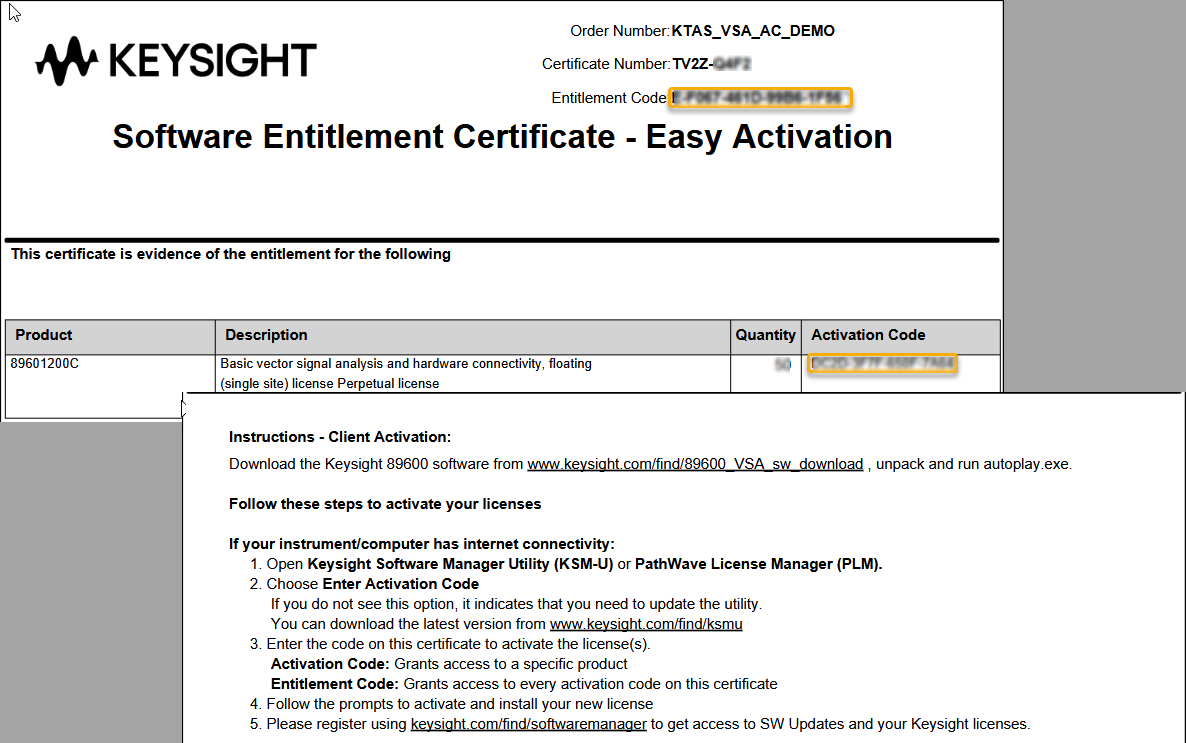
Your first step is to enter either an Activation code (to activate a specific product) or the Entitlement code (to activate all or any of the products in the order).
Step 1: Run Keysight Software Manager Utility (KSM-U) and click the Enter Activation Code button. Copy and paste your code into the field (shown below) then click Next.


Using Activation and Entitlement Codes
Step 2: Select the item or items you want to activate, assign a license quantity (if that option is available), then click Next.
Step 3: Check the host ID that will be assigned to the license. You can choose among other options by clicking the pencil icon. If everything looks okay click the Activate Now button.
Step 4: KSM-U communicates with Keysight and shows the results of the activation request. Click Finish and you are done.
What if the PC or instrument I want to license software on is not connected to the internet?
If your PC or instrument is not connected to the internet, then you will use the standard method of requesting a license from the Keysight Software Manager website.
You will need a host ID to assign to your license. To find this,
- Launch Keysight Software Manager Utility (KSM-U).
- Open the Add License view.
- Note the host IDs listed there.
Host IDs fall into these categories:
- A FlexNet ID (for example, 10-0bebf1c3).
- A Keysight Host ID (for example, PCSERNO,EG52729749)
- An ethernet MAC (Media Access Control) address (for example, 6c02e068d006)
The entitlement certificate you received contains information on which type of host ID is appropriate for the product you purchased. Keysight Software Manager also provides guidance on this topic during the license request process.
Along with the host ID, you will need the Order Number and Certificate Number from the top of the Entitlement Certificate you received from Keysight. With this information in hand, follow the procedure described in Receive Your License from KSM.