
Visual Test Automation: The UI Is What Users Judge, So Test That
A functional test can pass while the page looks broken. The button works, the form submits, the API returns a clean 200, and the layout has collapsed into an unreadable mess that no real user would tolerate. DOM-based tests don't catch it, because they verify structure, not appearance. They confirm that the button exists in the markup. They have no opinion on whether anyone can see it.
That gap is the whole reason visual test automation exists. The visible application is the part users judge, and most testing tools were never built to check it.
What visual test automation is
Visual test automation uses AI computer vision to validate applications the way users see them, rather than through DOM access or raw pixel comparison. It covers visual regression testing, GUI test automation, and cross-platform UI validation in one approach. The recognition identifies UI elements by appearance and meaning, so it catches genuine defects without flagging every legitimate change, and it runs across any device, browser, or operating system from a single test definition.
Why traditional UI testing falls short
There are two established ways to test the UI. Both have a structural flaw, and two further problems compound them:
- DOM tools miss visual defects. Selenium and similar tools check HTML structure, not what renders. A layout that breaks, an element that overlaps, an image that fails to load: the markup is still valid, so the test still passes.
- Pixel-comparison tools drown you in noise. Comparing screenshots pixel by pixel flags every legitimate change as a difference, so a font tweak or a date that updated triggers a failure. Real regressions get lost in the false positives.
- Cross-platform coverage fragments. Each browser, device, and resolution historically needed its own approach, scaling effort with every environment.
- Restricted access shuts tools out. Mainframes, Citrix and VDI sessions, packaged applications, kiosks and POS terminals, and locked-down environments block the source access DOM-based GUI automation depends on.
The first two are the interesting ones, because they're opposite failures. DOM tools see too little of the appearance. Pixel diffs see too much, with no judgement about what matters.
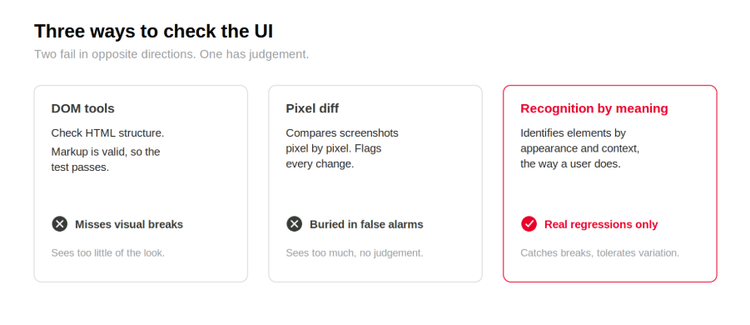
Fig 1. DOM tools check structure and miss visual breaks; pixel-diff tools flag every change as noise; recognition by meaning catches real regressions while tolerating legitimate variation.
Recognition by meaning, not pixels or selectors
The way out is recognition that works the way a person's does: identifying an element by appearance, position, and context rather than by exact pixels or DOM selector. A test that recognizes the "Checkout" button as the Checkout button doesn't care that the brand color changed or the corner radius is different. It cares whether the button is present, correct, and where it should be.
That single change fixes both traditional failures at once. Because recognition isn't tied to the DOM, the test catches rendering and layout breaks that structure-based tools miss. And because it isn't an exact pixel match, legitimate variation, dynamic dates, personalized content, animations, doesn't set off false alarms. Multiple recognition modes handle font changes, color shifts, and resolution differences without flagging them as defects: OCR for text, image matching for graphical elements, and a hybrid of the two.
This is also what makes visual regression testing usable. Traditional regression testing compares screenshots and calls every variation a defect, which buries the real ones. Recognition by meaning distinguishes an actual regression, a broken layout, a misaligned element, a missing image, from acceptable change, and runs the same regression checks across Chrome, Safari, Firefox, Edge, and mobile browsers from one definition.
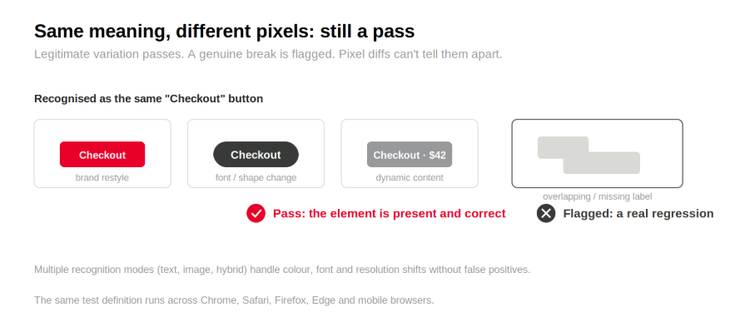
Fig 2. The same element across resolution, font and dynamic-content changes is recognized as the same, so legitimate variation passes while a genuine break is flagged.
Describing the element in plain English rather than capturing an image takes this further. Find by Description, released in Eggplant Functional 26.2, uses multi-modal AI to locate an element from a written description, so a test keeps running through redesigns, theme changes and resolution shifts with no image library to maintain.
GUI testing and visual testing, in one approach
GUI testing has historically meant functional checks (clicks, inputs, navigation) usually through DOM-based tools, while visual testing meant a separate discipline with separate tooling. Recognizing the interface by what's on screen collapses the two. The same test interacts with the GUI by appearance, validating both that the application works and that it looks right, and it extends to web GUIs, native desktop apps, mobile interfaces, mainframes, and packaged software with one approach.
This is where it reaches the systems other GUI tools can't. Testing through the visible interface needs no source access, so it works on packaged software, mainframe terminals, Citrix and VDI sessions, POS and kiosk hardware, and locked-down environments. Eggplant Test will run visual checks on a simple website fine, but that isn't where it earns its keep. Its strength is the cross-platform, high-stakes estate, including interfaces with no DOM at all, where visual correctness affects user trust and the usual tools can neither see the appearance nor reach the platform.
The savings show up in maintenance rather than runtime. American Electric Power reported $1.2M in annual savings against Selenium and 75% faster test execution. DEKRA cut change request testing from 15 hours to 1.
Common questions about visual test automation
What is visual test automation?
Using AI computer vision to test applications the way users see them, rather than through DOM access or back-end APIs. It covers visual regression testing, GUI test automation, and cross-platform UI validation in one approach, validating that the UI looks and behaves correctly regardless of the underlying stack.
What is visual regression testing?
Automatically detecting unintended visual changes in a UI between releases, broken layouts, misaligned elements, color shifts, missing images, before they reach production. Traditional approaches compare screenshots pixel by pixel; recognition-based approaches identify elements by appearance and structure, separating real regressions from acceptable variation.
How does visual testing differ from GUI testing?
GUI testing usually means functional validation (clicks, inputs, navigation), often via DOM-based tools. Visual testing validates how the interface looks: rendering, layout, fonts, colors, and consistency. Recognition-based visual automation combines both, interacting with the GUI by appearance rather than selector, so it confirms the application works and looks correct in one pass.
How does visual testing handle dynamic content?
When recognition is meaning-based rather than pixel-based, well. Pixel comparison fails on dynamic content because every legitimate change flags. Recognizing elements by meaning and structure validates that an element is present and correct without failing on minor variation, which suits applications with dates, personalized content, and dynamic charts.
How does visual test automation reduce GUI test maintenance?
GUI maintenance is dominated by rewriting scripts when the UI changes and triaging false positives from pixel diffs. Recognition adapts to changes that don't affect behavior, removing most rewrites, and identifying elements by meaning rather than exact pixels cuts false positives sharply, freeing QA time for real defect investigation.
Where this leaves you
DOM tools and pixel diffs fail the UI in opposite directions: one can't see appearance at all, the other sees every change as a defect. Recognition by meaning sits between them, catching the layout and rendering breaks structure-based tools miss while tolerating the legitimate variation that drowns pixel-based tools in noise. The same approach validates function and appearance together and runs across platforms from one definition, including the systems with no DOM to test against.
Worth a look at your own UI suite: how much of the maintenance is fixing real defects, and how much is quieting false alarms from tests that flag changes users would never notice?
See how Eggplant Test automates UI testing with visual verification →
Related Posts