
2026 Self-Healing Test Automation: Beyond Locator Patching
Key takeaways:
- Self-healing test automation has promised a lot, but many test teams still find that the current tools fall short in complex, real-world UI environments.
- Locator matching based on heuristics and machine learning still has limited healing capability.
- Powerful AI-driven semantic, visual, and contextual matching capabilities are what modern self-healing test automation needs to realize its promises.
Self-healing sounds like magic at first. If your developers are just wrapping buttons in new <div> elements or tweaking styles, it actually works. Modern self-healing tools handle such structural element changes with ease.
But what if a native <select> dropdown is replaced with a styled React dropdown component, a common real-world design change?
Suddenly, dozens of test scenarios fail that self-healing seems unable to fix. Locator-based tools throw missing element exceptions, and fingerprint-based tools confidently identify the wrong element. Most self-healing tools were built to handle locator shifts, not fundamental changes in interactions, workflows, or user interface semantics.
This gap between promise and reality is why many testing teams remain skeptical of self-healing automation despite years of vendor claims. However, the technology is evolving. The latest generation of automation platforms is moving beyond locator repair and visual matching alone. By allowing testers to describe interface elements using natural language, these systems can identify controls based on intent, context, and user-visible behavior rather than relying solely on technical identifiers.
The result is a more resilient approach to automation, one designed to adapt to changing interfaces without depending on brittle selectors, screenshots, or implementation details.
This article provides a candid overview of what self-healing test automation can realistically achieve today, where current approaches still fall short, and the advances that are beginning to close the gap between expectation and reality.
See how Keysight's advanced self-healing test automation tool works in practice. Book a demo
What is self-healing test automation?
Self-healing test automation refers to the ability of a test suite to update itself whenever there are changes in the user interface (UI) under test. Done right, this testing strategy can reduce the time and resources spent on self-healing test assets and broader asset maintenance.
However, self-healing automation is not for test creation. Nor is it a solution for failing tests due to changes in the underlying business logic or bugs in the functionality.
It primarily addresses failures caused by UI modifications such as layout changes, DOM changes, redesigns, styling updates, and other interface changes that do not fundamentally alter business functionality.
Three generations of self-healing
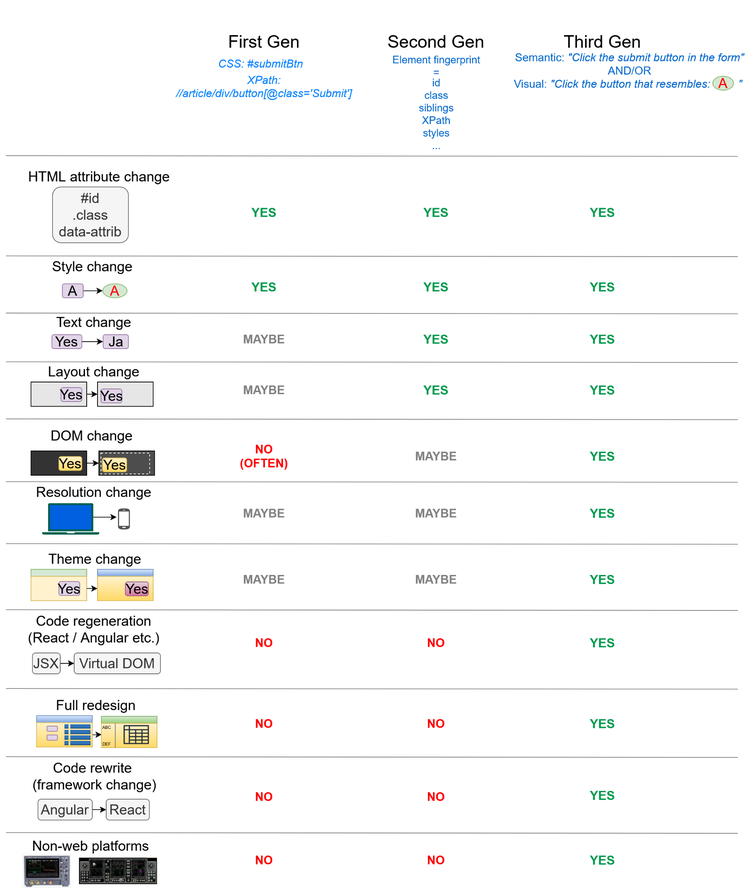
Figure 1. Evolution of self-healing systems
One useful way to think about the evolution of self-healing test automation is through three broad generations:
- First generation: These traditional test tools rely on cascading style sheet (CSS) and XPath element locators. If they fail, they use rule-based locators as a fallback. This heuristic approach works for trivial changes but results in broken locators for major layout, DOM, or text changes. They also fail when frameworks like React or Angular regenerate class names. Examples include self-healing Selenium plug-ins, Playwright plug-ins, and early Katalon.
- Second generation: Machine learning algorithms use multiple element attributes to score locator selections. Though this works better than the previous approach, it is fundamentally a form of locator patching. Testim, mabl, and BrowserStack Low-Code are some examples.
- Third generation: This AI-driven approach uses semantic understanding, contextual reasoning, and visual matching to identify interface elements. Tests describe what an element represents from a user perspective rather than relying on implementation details such as selectors, coordinates, or DOM paths.
See how Keysight's advanced self-healing test automation tool works in practice. Book a demo.
The sections below explain how these self-healing mechanisms work in more detail.
How does self-healing work?
All self-healing approaches involve five high-level steps:
- Detect: Runtime failures and exceptions during test execution are detected.
- Analyze: The root causes of the test failures and exceptions are analyzed. If they correspond to correctable issues, then the tools proceed with further steps.
- Adapt: The tool looks for similarity based on the generation of self-healing it implements. First-generation tools look for similar locators based on DOM paths or CSS selectors. Second-generation tools use multi-attribute fingerprinting using the element identifier (ID), name, CSS, XPath, text, relative position, and more. Third-generation tools rely on semantic understanding, contextual reasoning, visual matching, and natural-language descriptions to identify the most likely interface element. Once a match is found, it does confidence scoring. If it's reasonably confident about the match, a suitable heal is constructed. This involves changing the test case to use a different element ID, class, XPath, or some other attribute.
- Validate: After the heal is constructed, the test case logic is rerun to see if it fails. If it does, a fallback approach is used to construct an alternative heal. This process is repeated until the test succeeds or the tool exhausts its candidate heals.
- Learn: If a heal is successful, the tool records the circumstances by logging an audit trail that includes the selector that failed, the healed selector that succeeded, and a screenshot of the element. This audit log provides traceability and also helps to construct future heals.
Semantic Matching vs. Locator Patching
While traditional test automation focuses on fixing broken locators reactively, next-generation platforms bypass technical dependencies entirely. By leveraging visual matching and natural-language descriptions, these systems identify interface elements through user-visible intent and contextual reasoning.
Consider a scenario where a test case defines a control as:
“the blue Submit button at the bottom of the form”
This approach moves beyond reliance on a specific XPath, CSS selector, or static identifier.
Should the element relocate, undergo styling updates, or be refactored into a new UI framework, the AI-driven engine maintains resilience. It identifies the target based on its functional role and surrounding context rather than fragile implementation details.
Changes that self-healing cannot handle
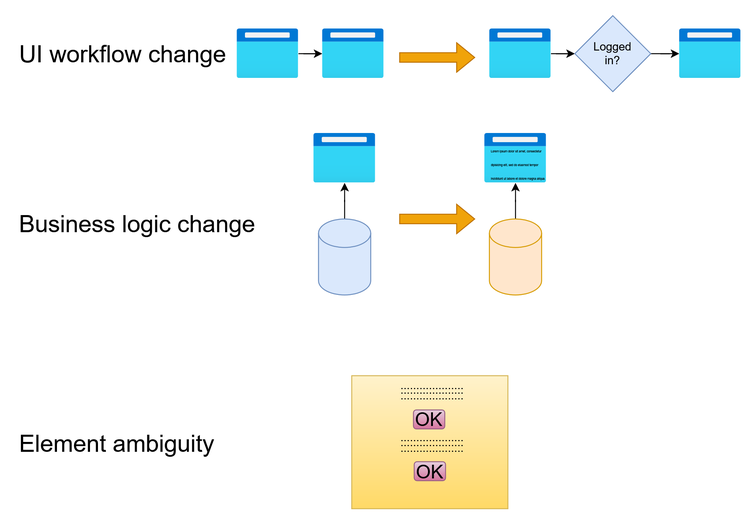
Figure 2. Scenarios that current self-healing systems don't handle well
Awareness of the current limitations of self-healing is essential to avoid inefficient development and disappointment. Here are some application changes that existing self-healing systems still cannot handle well:
- Workflow changes: If a UI workflow changes, current tools often can't handle it. Most self-healing tools still cannot reliably incorporate that kind of workflow change into existing test scripts without human review.
- Business logic changes: If business logic or an application programming interface (API) changes, the test itself may become invalid in a way that self-healing cannot address.
- Element ambiguity: If a screen has multiple plausible elements, healing can sometimes pick the wrong one. Some traditional tools also fail if localization changes some text captions.
Do you really need self-healing test automation?
Most self-healing test automation tools on the market today are optimized for teams with large, frequently changing UIs. Realistically, they’re unlikely to improve productivity or turnaround time if your product or quality assurance (QA) teams have these traits:
- Low application complexity: For small suites, manual test updates are faster. Self-healing tests are better for large, complex applications where test maintenance is a major time sink.
- Infrequent UI changes: Self-healing tests are ideal for systems with frequently updating UIs. Such systems are either under active development or involve dynamically generated UIs. Self-healing testing won't benefit back-office applications with infrequent UI changes.
- Lack of team discipline: Self-healing tests demand good review discipline to prevent false positives. They're not a quick fix if your QA teams are not already practicing good test hygiene.
When does self-healing actually pay off?
Self-healing test technologies will likely benefit your organization if any of these apply:
- The product UI changes frequently.
- The system has an atypical UI, such as that of a medical device, an aviation cockpit display, or a measuring instrument.
- The test suites are large.
- Your teams follow agile software delivery practices, such as fast release cycles, daily shipping, and continuous testing.
- The product serves regulated industries that require audit trails, such as healthcare or automotive.
- Your testers are spending more than 20% of their quality assurance time on test maintenance.
What should you look for in a self-healing tool?
If you’re currently bleeding maintenance time, evaluating self-healing test automation tools that understand actual visual and semantic behaviors is a good place to start.
Use the self-healing capabilities rubric below to home in on tools that can genuinely close the gap between release cadence and test reliability.
Reliable element identification
Traditional automation that primarily relies on XPath or CSS selectors is fragile. A simple class rename, or a new element somewhere up the DOM tree, can break their test scripts.
Instead, opt for tools that build fingerprints of elements using multiple attributes like their metadata, spatial coordinates, DOM relationships, and visual context. Even if a few attributes change during design, they can reliably identify the intended element using the other attributes.
Review workflow instead of silent healing
Silent auto-healing can be dangerous. If a tool silently misidentifies a "Cancel" button as the "Submit" button, defects in your critical applications may remain undetected. A healed test whose changes cannot be reviewed must not be trusted.
Look for tools that treat self-healing as suggestions for manual intervention. They typically add a confidence score to each suggestion and support mandatory human intervention before modifying test scripts.
Full audit logs
The tool must generate clear audit logs for each heal with details such as:
- the exact failure
- the element or path that the tool selected instead
- the logic behind that selection
If developers can't find out how or why a test was healed, they can't identify the underlying issues and flakiness in the application.
Visual and semantic matching
DOM-based self-healing often works well only for web applications. It struggles with many non-web environments such as desktop applications, remote desktops, embedded systems, and proprietary interfaces.
To overcome these limitations, modern automation platforms increasingly combine visual recognition with semantic understanding. Rather than relying solely on selectors, screenshots, or implementation details, the platform should be capable of identifying interface elements through their visual appearance, surrounding context, textual descriptions, and intended user function.
This enables greater resilience across UI redesigns, localization changes, framework migrations, resolution differences, and evolving application architectures.
Natural-Language Element Identification
One of the most promising developments in test automation is the ability to identify UI elements using natural-language descriptions.
Instead of maintaining screenshots, selectors, or technical object repositories, testers can describe an element using human-readable language such as:
- the Submit button at the bottom of the form
- the Search field in the top navigation bar
- the Add Customer button beside the customer list
The automation platform interprets the description, evaluates the visual and contextual characteristics of the interface, and identifies the most likely matching element. This approach reduces maintenance effort while making tests easier to understand and review.
Backward and legacy compatibility
Rewriting large legacy Selenium or Appium test suites to support self-healing is impractical for most teams.
The tool must support real-time and incremental integration of self-healing into existing tests or an existing end-to-end testing suite without a full rewrite. Common ways to achieve this are wrapper components or proxies that intercept real-time test traffic.
Continuous integration and deployment (CI/CD)
The tool must support headless or containerized execution as part of existing Jenkins, GitHub Actions, or Azure DevOps CD pipelines. The bulk of self-healing must be performed automatically during the build process for cases with high confidence scores, and the results must be fed back to prevent deployments from being blocked by false-positive failures.
Where is self-healing headed?
The following are key trends in self-healing systems:
- Semantic understanding: Testers will increasingly describe interface elements using natural language while automation platforms interpret intent, context, and visual characteristics to identify the correct controls.
- Proactive resilience: Instead of reacting to failures after they occur, testing platforms will increasingly use semantic and contextual understanding to remain resilient through UI changes by design.
- Focus on test intent: Most maintenance effort will be on what to test, not on how to test or on script maintenance.
The next 12 months will streamline and reset what self-healing actually means — worth tracking which vendors deliver versus which keep marketing the old approach.
Your next steps on self-healing tests
Keysight has been at the forefront of software test automation for inherently hard-to-test systems. Its latest innovations focus on combining visual automation, semantic understanding, and natural-language element identification to help teams reduce maintenance while improving test resilience across changing applications. To get started:
- Audit your current test maintenance costs in hours per week and percentage of QA capacity.
- Identify your top five most frequently broken tests and ask why.
- Keep track of which vendors deliver solutions for them and which ones continue to market the old approaches.
See how Keysight's advanced semantic and self-healing automation capabilities work in practice, including natural-language element identification designed to reduce maintenance and improve resilience across evolving applications. Book a demo.
Related Posts