
Optimizing Your Design in CODE V and LightTools
The latest trend for many optical applications is to bring multiple design facets together to complete all the steps necessary to turn concepts into market-ready products. While some bridges exist between photonic and optical designs and between optics with multi-physics matters, perhaps the most compelling need has been for a bridge between imaging and illumination design, where designs often require numerous iterations in the quest for perfection. Add to this the advancements in optimization and tolerancing, stray light elimination, and the importance of accuracy (especially for augmented and virtual reality systems leveraging sensors and optics, where user immersion is of paramount importance), and it is clear that interoperability between imaging and illumination models is a must-have in facilitating the rapid development of accurate designs.
Combining the Power of CODE V and LightTools
Over the last several years, LightTools has been able to leverage RSoft Photonic Device tools to use patterns from LED) extraction features to trace rays into the far field, and CODE V has been able to design projection lenses in LucidShape for advanced pixel lighting solutions for automotive headlight systems. To build on this momentum, CODE V and LightTools were integrated, creating a seamless engineering, design, and simulation experience in LucidShape for advanced pixel lighting solutions for automotive headlight systems. To build on this momentum, CODE V and LightTools were integrated, creating a seamless engineering, design, and simulation experience.
New and improved interoperability features between CODE V and LightTools enable designers to easily simulate optical systems that contain imaging and non-imaging components to save product development time. CODE V surface-based models are automatically converted to solid models in LightTools for high-fidelity optical product simulations. Design updates are seamlessly maintained between the products, including all optical properties, receivers, and sources.
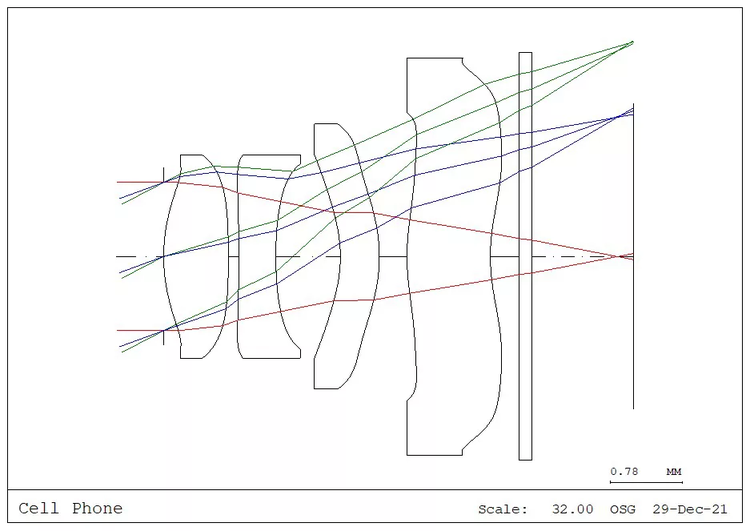
Figure 1. Cell phone camera lens in CODE V.
On the CODE V side, you start by opening a sequence file with the model of interest, like this cell phone camera, for example. After the initial model is made, CODE V can generate the .osf file for LightTools to read.
Rays generated in CODE V for design and visualization purposes are also included in the .osf file.
On the LightTools side, you can start by loading a model that features the cell phone housing, which you can generate in LightTools or using SOLIDWORKS and the LightTools SOLIDWORKS Link Module. Then you can import the .osf file and mate it with the mounting geometry, with baffles and aperture stops being combined through Boolean operations. In the resulting model, you can either start the stray light analysis process or investigate mismatches or other potential issues.

Figure 2. The .osf model of the same cell phone camera lens, opened in LightTools.
If it is necessary to make changes to the optics in CODE V for performance reasons, you can import them via another .osf file, and LightTools preserves all internal changes such as optical property changes and Boolean operations. You are then able to work with the model as needed.


Figure 4a. and 4b. The design intent of the surface group determined in CODE V dictates how LightTools perceives prism lines and builds the geometry.
The Path to Interoperability
Being able to take work from CODE V to LightTools is the first step toward full interoperability. Multiple disciplines meet in LightTools, with imaging joining illumination, then enhanced by mechanical CAD.
CODE V for Imaging Design
- Built-in optimization intelligence gives you the best design solutions, as fast as possible.
- Wavefront Differential Tolerancing algorithm provides the fastest, most accurate tolerancing to reduce manufacturing costs.
- Powerful, efficient diffraction analysis.
LightTools for Illumination Analysis
- Sophisticated solid modeling with full optical accuracy and state-of-the-art ray tracing speed.
- Multiple optimization engines are specially tailored to solve illumination and stray light challenges.
- Advanced stray light analysis pinpoints and corrects issues early in the design process — including ghost images and flare.

Easily Import and Update Your Model
- Transfer a CODE V lens file to LightTools with ease and accuracy.
- When importing a CODE V model into LightTools, LightTools will automatically convert surface-based models into solid models.
- Maintain the surface geometry from CODE V while optical properties, receivers, sources are applied in LightTools.
- Work in a seamless, iterative design environment.
- As your design changes, you can apply updates from CODE V into LightTools with a click of a button.
- Develop your best design as fast and as error-free as possible.
Leverage the industry-leading design, optimization, and tolerancing capabilities of CODE V and LightTools to develop a broad range of optical systems, from augmented reality headsets and head-up displays to smartphone optics and electro-optical imaging systems.