
CODE V 2026: Faster Optical Design with AI‑Driven Starting Points and Deeper System‑Level Insight
Introduction
Modern optical design workflows require an efficient optical design process. Engineers must rapidly explore design spaces, account for fabrication and alignment realities, and understand how a lens performs as part of a full imaging system, including stray light, sensor behavior, and image processing.
The CODE V 2026 release focuses on accelerating these workflows while maintaining the physical rigor required for real‑world systems. New capabilities such as AI Start Expert, Accelerated Custom Tolerancing, expanded diagnostic macros, and Lens Performance Data (LPD) export help optical engineers move more efficiently from initial concepts to validated, system‑level performance. These updates also strengthen integration across the Keysight Optical Design portfolio, including LightTools and ImSym.
Accelerating Early Design Exploration with AI Start Expert
Generating high‑quality starting point lenses remains a critical—and often time‑consuming—step in optical design. CODE V 2026 introduces AI Start Expert, a locally executed, GenAI‑powered tool that generates viable starting point designs from a concise set of user specifications.

Figure 1. AI Start Expert takes user specifications and generates starting point lenses according to those specifications
The AI Start Expert allows engineers to specify:
- Field of view
- Effective focal length
- Aperture (EPD, NA, or F/#)
- Optional constraints such as distortion and image clearance
The resulting designs are immediately usable within standard CODE V workflows, including Global Synthesis, Asphere Expert, Glass Expert, and optimization.
Key characteristics:
- Supports fully refractive, axis‑symmetric, visible focal systems
- Applicable to camera, telephoto, retrofocus, and wide‑angle lenses, as well as microscope objectives and collimators
- Multiple ranked starting points with summarized performance metrics
- Entirely on‑premise execution with no cloud dependency
By shortening the time required to arrive at a usable starting point, AI Start Expert allows engineers spend more effort evaluating trade‑offs and refining performance rather than constructing initial lens forms.
Modeling Real Manufacturing and Alignment with Accelerated Custom Tolerancing
Tolerance analysis is critical to determine whether a design is manufacturable, yet realistic alignment workflows can be complex to model. CODE V 2026 expands its tolerancing capabilities with Accelerated Custom Tolerancing, implemented through the UserTol macro.

This approach is designed to represent real assembly processes by supporting multi‑step alignment and compensation strategies, rather than assuming idealized single‑step corrections.
Key capabilities include:
- Parallelized Monte Carlo and sensitivity analyses using the same inputs
- Step‑based alignment workflows with repeated compensation cycles
- Arbitrary user‑defined performance metrics
- Advanced statistical outputs, including:
- Yield estimates with uncertainty
- Aggregate pass/fail metrics
- Cumulative probability after each compensation step
These enhancements allow engineers to evaluate alignment strategies earlier in the design process and quantify yield risk before designs reach manufacturing.
Earlier Detection of Stray Light and Aberration Issues with New Macros
CODE V 2026 introduces several new macros that automate diagnostic tasks and provide deeper insight into system behavior with minimal setup effort.

Figure 3. Ghost footprint plot and ghost path visualization
New macro capabilities include:
- Ghost analysis macros for ghost path visualization and ghost footprint plotting
- Wave aberration macros for computing and visualizing 4th‑ and 6th‑order wave aberration coefficients
- VIE labeling macros to clearly identify glass types and surface numbers in lens drawings
- CALC_TGR macro for automated selection of transform grid size in PSF‑based analyses
- GenerateGDS macro to support OASIS file format for metalens layout generation.
Ghost analysis macros, in particular, help identify problematic surface pairs early. These results allow engineers to address issues early in the optimization phase, followed by more detailed stray light analysis in LightTools, where housing effects and scattering can be considered in greater detail.
Connecting Lens Design to Imaging Performance with Lens Performance Data Export
Evaluating lens performance in isolation does not capture the full behavior of an imaging system. CODE V 2026 adds Lens Performance Data (LPD) export, enabling seamless integration with ImSym Imaging System Simulator.
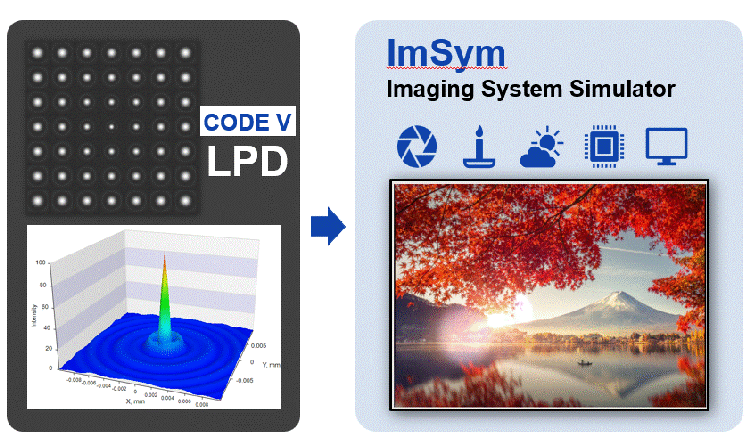
Figure 4. CODE V → ImSym system-level workflow
LPD files describe essential lens performance characteristics—such as point spread functions and distortion data—without exposing lens construction details. These files allow ImSym to simulate complete imaging systems that include:
- Scene‑based and additive stray light
- Detector geometry, pixel properties, and noise models
- Image signal processing algorithms
This workflow enables engineers to assess how lens performance translates into final image quality across multiple use cases, operating conditions, or batch simulations—supporting applications such as design validation and AI training data generation.
Learning and Workflow Support with Expanded Example Models
To help users adopt new features efficiently, CODE V 2026 adds 13 new and updated example models to the Example Model Library. These include examples focused on:
- AI Start Expert workflows
- Accelerated custom tolerancing and alignment
- Wave aberration diagnostics
- Application‑based designs, such as automotive head‑up displays (HUDs)
These examples provide practical reference points, demonstrating how new capabilities fit into established optical design workflows.

Figure 5. Polarization-Sensitive Metalens example model in CODE V 2026
Conclusion
The CODE V 2026 release enhances optical design productivity by accelerating early exploration, improving realism in tolerancing and alignment analysis, and strengthening connections to system‑level simulation. The AI Start Expert reduces time to viable starting points, Accelerated Custom Tolerancing brings manufacturing considerations earlier into the workflow, and new macros and data export capabilities improve diagnostic insight and cross‑tool integration.
Together with LightTools for illumination and stray light analysis and ImSym for imaging system simulation, CODE V helps optical engineers design better systems faster—while maintaining confidence that those designs will perform as intended in real‑world applications.