
What is End-to-End Testing?
What is end-to-end testing?
End-to-end testing (E2E testing) validates a complete user workflow from start to finish, across every system, service, and integration involved. Rather than testing components in isolation, it verifies that the full chain works the way a real user would experience it: inputs, outputs, data flows, and all.
The scope is deliberate. A single E2E test might span a UI, an API, a database, a third-party payment processor, and an email notification service. Each layer gets exercised as part of one connected journey, not separately.
Why end-to-end testing matters
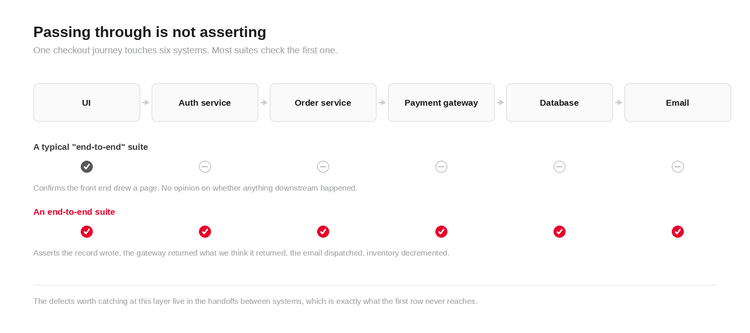
Passing unit tests don't tell you the software works. Passing integration tests don't either. They tell you the parts work. What they can't tell you is whether those parts hold together under real conditions, in the right sequence, with real data moving between them.
A login flow passes. A payment API passes. A database write passes. The checkout still fails, because the session token isn't forwarded correctly between the authentication service and the order management system. Nobody's unit test was looking at that.
End-to-end testing closes that gap. It's the only test type where a failure means the user would have failed, which is usually the only failure that matters.
How end-to-end testing works
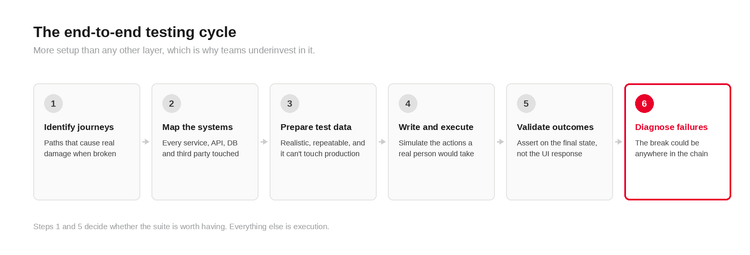
The process has more setup than unit or integration testing, which is why teams underinvest in it. A typical cycle runs like this.
- Identify critical user journeys. Not every flow needs an E2E test. Focus on paths that cause genuine damage when broken: checkout, login, account creation, data submission, key transactions.
- Map the systems involved. Document which services, APIs, databases, third-party tools, and environments each journey touches. This is where teams find out how many dependencies they actually have.
- Prepare test data. E2E tests need realistic data that doesn't contaminate production. Test environments have to mirror live closely or the results mislead you.
- Write and execute tests. Tests simulate real user actions: clicking, entering data, submitting forms, triggering background processes, waiting for expected results.
- Validate outcomes. Assertions check the final state, not just the UI response. Did the database record write? Did the confirmation email fire?
- Report and diagnose failures. Root cause analysis is harder than for unit tests, because the failure could have originated anywhere in the chain.
End-to-end vs functional vs integration testing
These three overlap in purpose but differ in scope, ownership, and where they expose problems.

These aren't alternatives. They're layers. E2E sits at the top of that stack and shouldn't be asked to do the work of the layers below it.
Examples of end-to-end testing
eCommerce checkout. A customer searches for a product, adds it to a cart, applies a discount code, enters payment details, and receives an order confirmation. The test validates inventory reservation, payment gateway response, order record creation, and confirmation email dispatch.
Banking password reset. A user requests a reset, receives an email, clicks the link, sets a new password, and logs in. The test verifies the token generates and expires correctly, the credentials update in the auth service, and the old session is invalidated.
Healthcare patient intake. A patient completes registration, uploads insurance documents, and receives a booking confirmation. The test confirms data flows from the patient portal to the scheduling system and the records database without loss or corruption.
Insurance claim submission. A policyholder files a claim, uploads documents, and receives a reference number. The test validates that claim data routes to the underwriting system, triggers an acknowledgement, and creates the right audit trail.
ERP order-to-cash. A sales order is created, inventory checked, fulfilment triggered, shipping confirmed, invoice generated. One of the more complex flows in enterprise software, where a failure at any stage stalls revenue recognition.
Mobile account setup. A new user installs an app, registers, verifies via OTP, and completes a profile. The test checks the registration service, OTP delivery, profile data write, and app state after each step.
Common end-to-end testing problems
Brittle tests. Suites built around specific UI selectors break every time the frontend changes. Any team that has been through a redesign knows this one.
Unstable test environments. If the environment doesn't reliably mirror production, failures become noise. Teams stop trusting the suite and stop running it.
Test data management. Without a proper strategy, tests either conflict with each other or produce results nobody can trust.
Slow execution. A suite that takes three hours doesn't fit in a pipeline. Teams skip it or run it rarely, which defeats the point.
Third-party dependencies. Payment gateways, identity providers, and external APIs introduce failure modes outside the team's control. Handle them through mocking, contract testing, or clear scope boundaries.
Unclear ownership. When tests span teams, nobody wants to own the failures, so tests go unrun and unfixed.
Poor failure diagnosis. A failing E2E test says something is wrong somewhere in a long chain. Without good logging, finding the cause takes longer than it should.
The first of those is the one that kills most suites, and its cause is structural rather than procedural. A suite pinned to the DOM inherits every fragility of the DOM, and no amount of discipline fixes that.
How automation changes end-to-end testing
Automation makes E2E testing repeatable, faster to execute, and possible to run inside a CI/CD pipeline. That's the genuine upside.
What it doesn't fix is bad test design. An automated version of a poorly scoped test is still a poorly scoped test. Automation also doesn't solve the environment problem, the test data problem, or unclear ownership.
Where it makes the biggest difference:
- Running regression suites on every build without manual intervention
- Cross-platform execution across browsers, devices, and operating systems
- Parallel execution that cuts overall runtime
- Consistent, reproducible results that don't vary with who ran the test
Mature automation combines UI automation, API-level validation, visual checks for UI correctness, and pipeline integration. Model-based testing is one approach to generating and maintaining test cases automatically, which matters most on large applications where manual test maintenance becomes the bottleneck. Keysight's Automation Intelligence (Eggplant Test) works this way: a model of the application generates the paths, and computer vision drives the interface, so the same journey runs on systems that expose no DOM at all.
Automation doesn't replace deciding what to test. It executes decisions already made.
How to choose an end-to-end testing approach
Coverage. Can it reach everything in the journey: UI, APIs, databases, third-party services? If it only reaches the frontend, it isn't a full E2E solution.
Maintainability. Scripts that break on every UI change are a tax on engineering time. Look for approaches that cut the cost of keeping tests current, through model-based generation, visual automation, or abstraction that isolates tests from UI structure.
Cross-platform execution. If users run your software across different browsers, devices, and operating systems, the tests need to cover that surface too.
Orchestration across environments. A journey that spans a browser, a desktop client, a back-end table and a peripheral device has to run as one coordinated flow, not four scripts stitched together by hand. This is where most tooling struggles, and it is the difference between a suite that reaches the whole journey and one that reaches only the parts that were easy to reach.
CI/CD integration. Tests that can't be triggered on a build are tests that won't get run. Check how the tooling fits Jenkins, GitHub Actions, Azure DevOps, or whatever you use.
Reporting. When tests fail, how fast can you find where and why? Root cause analysis is the hard part of E2E debugging.
Scalability. Twenty tests are easy to manage. Two thousand are not. Think about it before you're locked in.
Governance and traceability. In finance, healthcare and aerospace, results often need to map to requirements and be audit ready. Not every tool supports this well.
What that looks like in numbers: JetBlue reported that execution time for its Flightkeys UI systems fell 93%, taking three weeks of manual testing down to a single day. FUJIFILM Software reported a 92% reduction in man-hours across its testing process compared with conventional manual testing.
Full detail on the approach sits on the end-to-end testing capability page.
End-to-end testing FAQs
What is the difference between end-to-end testing and integration testing?
Integration testing checks that two or more components communicate correctly. End-to-end testing validates an entire user journey across all systems involved, including UI, APIs, databases, and external services. Integration testing is a subset of the picture. End-to-end testing is the full picture from the user's point of view.
How long do end-to-end tests take to run?
It depends on suite size and whether tests run in parallel, but full suites for enterprise applications routinely take 30 minutes to several hours. Teams typically run a shorter smoke suite on every build and the full suite on a schedule or before release.
Who should own end-to-end testing?
QA engineers and SDETs write and maintain most end-to-end tests. Ownership of failures should be shared: a test failing because of a backend API change belongs to the backend team, not QA. Clear handoff protocols matter more than a single owner.
Can end-to-end tests run in a CI/CD pipeline?
Yes, with the right setup. The constraint is execution time. Run a targeted smoke suite on every commit and the full regression suite on a schedule or pre-release, with parallel execution across machines to bring total runtime down.
What tools are used for end-to-end testing?
Selenium, Cypress and Playwright are the common DOM-based options for web applications. Model-based and computer-vision platforms such as Keysight Eggplant Test cover the same journeys plus the systems that expose no DOM, including Citrix, mainframe terminals, embedded devices and packaged software.
Can you run end-to-end tests on systems with no DOM or restricted source access?
Yes, but not with selector-based tools. Citrix sessions, mainframe terminals, kiosks, POS hardware and embedded interfaces expose no object model to query. Testing them means driving the rendered screen directly through image recognition and OCR, which is the only approach that reaches them without modifying the application.
How many end-to-end tests should you have?
Fewer than you think. The testing pyramid puts end-to-end at the top for a reason: they're slow, expensive to maintain, and hard to diagnose. Cover the journeys where failure causes real damage, and push everything else down to integration and unit level.
What is the difference between end-to-end testing and user acceptance testing?
End-to-end testing verifies the system works across every layer of the technical stack. User acceptance testing verifies the system does what the business asked for and is usually run by business users rather than QA. One checks the machinery; the other checks the requirement.
Where this leaves you
End-to-end testing is the only layer that fails when the user would have failed. That makes it the most valuable suite you own and the hardest to keep alive, because the same breadth that gives it value makes it slow, brittle and awkward to diagnose.
Most of those problems are architectural rather than procedural. A suite pinned to the DOM inherits every fragility of the DOM, and no amount of discipline fixes that.
The orchestration side of that, running one journey across devices, platforms and databases as a single coordinated flow rather than a set of stitched-together scripts, is set out in the End-to-End Testing with Keysight Eggplant solution brief.
Related Posts