
Cross-Platform Testing: Why One Test Should Run Everywhere
The reason cross-platform testing is painful isn't that there are a lot of platforms. It's that most testing tools were built to handle one at a time. Each browser, each operating system, each device gets its own script, its own selectors, its own maintenance. Support ten environments and you've signed up to maintain ten test suites that all check the same thing.
That math only gets worse. Every new device family, OS version, or form factor adds another column to the matrix, and the effort scales with it. At some point the team makes the unspoken decision that most teams make: test the platforms that are easy to reach and hope the rest behave.
What cross-platform testing is
Cross-platform testing validates that an application works correctly across the full range of devices, operating systems, browsers, and environments people use to reach it. The goal is consistent function, performance, and visual quality no matter how a user arrives.
The approach that scales doesn't write a script per platform. It interacts with the application the way a user does, by what's on screen, so a single test definition runs everywhere instead of being rebuilt for each environment.
Cross-platform testing versus cross-browser testing
These get conflated, and the difference matters when you're scoping coverage. Cross-browser testing is a subset: it checks that a web application works across Chrome, Safari, Firefox, and Edge. Cross-platform testing is broader, covering operating systems, device types, mobile and desktop applications, mainframes, and packaged software as well as browsers.
For most enterprises, the user experience extends well past the web browser, which makes cross-platform the relevant scope. Testing browsers alone leaves the rest of the estate uncovered, and the rest of the estate is usually where the awkward, high-value workflows live.
Why per-platform scripting falls short
Three things break the traditional approach as the platform matrix grows:
- Manual coverage can't scale. Testing every device, OS, and browser combination by hand is impossible at modern release velocity, so real gaps open up.
- Platform-specific scripts multiply effort. Separate automation per environment scales the work linearly with every supported combination.
- Restricted access shuts tools out. Mainframes, packaged applications, and locked-down environments often block the source-level access traditional automation depends on, so they get excluded from coverage entirely.
The pattern underneath all three is the same. The tooling is tied to how each platform is built, so each platform needs its own treatment.
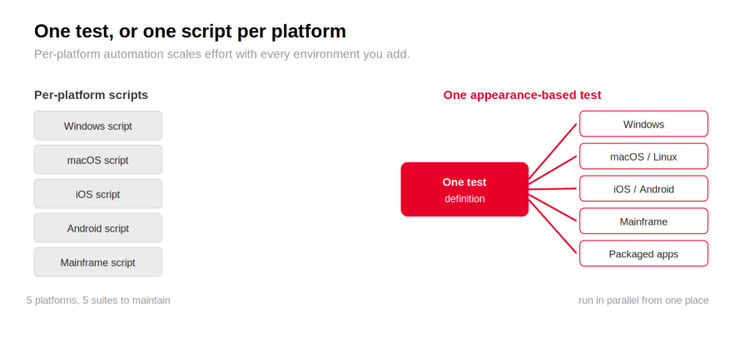
Fig 1. Traditional automation needs a separate script per platform, scaling effort with every environment; one appearance-based test definition runs across all of them.
How visual-based testing covers everything
If a test recognises elements by how they look on screen rather than by selector or DOM structure, the technology behind the platform stops mattering. The same test logic runs against a web browser, a mobile app, a desktop application, a mainframe terminal, or a packaged software interface, because all of them render something a user can see, and the test works from that.
This removes the dependency that fragmented testing in the first place. There are no platform-specific selectors to maintain, no per-OS accessibility hooks, no instrumentation to inject. One test definition, run in parallel across devices, browsers, and operating systems from a central point, covers the matrix without scaling the effort to match it.
It also reaches the systems that defeat selector-based tools completely. Testing through the visible interface needs no source code access at all, which is exactly what makes it work on packaged software, mainframe applications, third-party systems, and locked-down environments. Eggplant Test will validate a website across a few browsers fine, but that isn't where it earns its keep. Its strength is the enterprise estate that mixes modern web apps with legacy mainframes and packaged software, the environments where source access is restricted and traditional automation simply can't go.

Common questions about cross-platform testing
What is cross-platform testing?
Validating that an application works correctly across the devices, operating systems, browsers, and environments users access it from. The aim is consistent functionality, performance, and visual quality everywhere. Appearance-based approaches interact with the application the way users do, which removes the need for separate scripts per platform and reaches environments where source access is restricted.
How is cross-platform testing different from cross-browser testing?
Cross-browser testing is a subset focused on web browsers (Chrome, Safari, Firefox, Edge). Cross-platform testing also covers operating systems, device types, mobile and desktop apps, mainframes, and packaged software. For enterprises whose users go beyond the browser, cross-platform is the relevant scope; cross-browser alone misses most of the estate.
Can a single test cover multiple operating systems?
With appearance-based recognition, yes. Traditional tools need separate scripts per OS because they depend on platform-specific selectors or DOM structure. A test that works from what's on screen runs across Windows, macOS, Linux, iOS, Android, and mainframe environments from one definition, which cuts the per-platform maintenance sharply.
How do you test applications without source code access?
By interacting with the visible interface rather than the DOM, accessibility APIs, or instrumentation hooks. Computer-vision testing works through the same channel users do, the screen, so it needs no source access. That makes it suitable for packaged software, mainframes, third-party systems, and locked-down environments traditional tools can't reach.
What's the best approach to mobile and desktop coverage?
If mobile and desktop are owned by separate teams with different processes, specialised per-platform tools can work. Where the same workflows need consistent validation across both, one appearance-based approach to mobile and desktop testing gives lower total maintenance overhead. The choice comes down to whether unified coverage or per-platform depth is the priority.
Where this leaves you
Cross-platform testing isn't hard because of the number of platforms. It's hard because the usual tooling ties every test to how a specific platform is built, so each one needs its own script and its own upkeep. Testing by what's on screen removes that tie, which is what lets a single test run across web, mobile, desktop, and the legacy and packaged systems that selector-based tools can't reach at all.
If you mapped your real platform matrix today, how much of it is actually under automated test, and how much is being covered by hope?
Related Posts