
Keysight Optical Design Engineering for Designing Display Systems for AR/VR
Extended reality (XR) is a rapidly evolving technology that merges the physical and virtual worlds to create immersive experiences. XR technology encompasses augmented reality (AR), mixed reality (MR), and virtual reality (VR), a continuum that allows users to experience varying amounts of digital content overlaid on the real world. As technology advances, XR applications are expanding into diverse fields, including automotive, aerospace, healthcare, education, retail, tourism, gaming, and entertainment. This article explores a key optical system in XR devices and highlights Keysight Optical Design Engineering products for designing display systems for these innovative applications.
Extended reality (XR) combines physical and virtual worlds
Devices such as head-up displays (HUD), head-mounted displays (HMD), and smart glasses blend physical and virtual elements to create the XR continuum of experiences. AR adds virtual elements to the real environment, allowing users to see a mixture of the physical world and created content. It serves as a supplement to the physical world, like a HUD in a car showing the next turn you should take. MR adds virtual elements to real environments and allows them to interact and influence each other, enabling users to manipulate virtual objects set in the physical world. VR creates a virtual world in a completely closed environment, allowing users to fully immerse themselves in it. XR refers to the continuum for all technologies that alter or enhance our perception of the real world, including AR, VR, and MR.
XR applications expand as technology advances
One of the first applications of AR was head-up and helmet-mounted displays for military applications. As technology improves and costs decrease, other applications became economically feasible. Estimates of market size vary, but significant growth, with a compound annual growth rate (CAGR) of 25 to 30 percent, is predicted. In addition to reducing costs, worn devices must be comfortable, leading to constraints on size, weight, and aesthetics.

Figure 1. Examples of wearable XR displays.
Key optical system in XR Devices: Combiner optics
Combiner optics are essential components in XR devices. These optics merge the virtual world with the physical environment, allowing users to see digital content overlaid on real-world scenes. The combiner optics in XR devices include refractive/reflective combiners and waveguide combiners, each offering unique advantages for different applications.
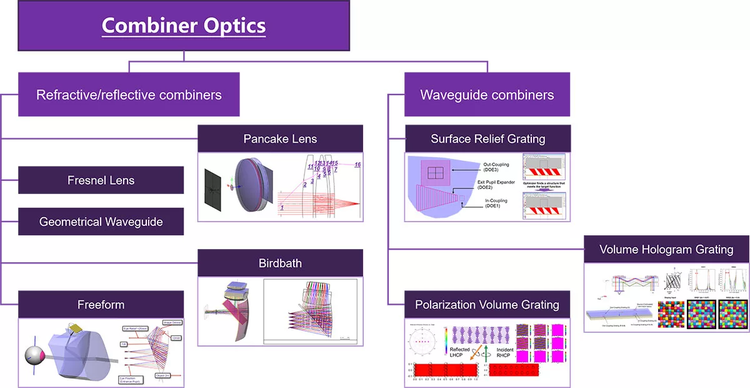
Figure 2. Combiner optics for XR devices
Keysight Optical Design Engineering has a suite of software products, services, and simulation software. These include CODE V, our imaging software, LightTools for illumination design and system prototyping, and our RSoft photonic device tools for modeling passive and active photonic devices. In addition to these distinct products, we also have connections between them.
Refractive/reflective combiners
Imaging design in CODE V
Imaging design in XR devices involves creating optical systems that can relay digital content from a display to the user's eye. CODE V is used to optimize these imaging systems for best performance. The design process typically involves modeling the system in reverse orientation and considering only the display path. Various design forms include:
- Freeform prism AR
- Birdbath AR
- Pancake VR

Figure 3. Sequential models optimized in reverse orientation in CODE V. Only display path considered.
Traditional lens design metrics, such as RMS spot size and diffraction MTF, provide quantitative analysis for optimizing these systems. Another analysis option is the 2D Image Simulation, which simulates the appearance of a two-dimensional input object as it is imaged through the optical system in CODE V. This simulation includes the effects of diffraction and aberrations, allowing for precise adjustments.
System analysis and stray light in LightTools
After designing the imaging system in CODE V, the optical system file (OSF) containing lens data is exported to LightTools for further analysis. In LightTools, a user can add sources, receivers, and detailed optical properties such as bi-directional scattering distribution functions (BSDF) to the model. Surface properties such as polarization coatings can be modeled in RSoft to capture performance as a function of wavelength, incident angle, and polarization, and the BSDF Generation Utility can then be used to export this model for use in LightTools.
Simulation in LightTools combines the physical scene and the display image. In addition, stray light effects are visible. Features in LightTools aid in the identification and mitigation of stray light.

Figure 4. LightTools shows the combination of scene and display, including stray light effects, as shown here for a birdbath MR system.
In addition to quantitative analysis, LightTools can optimize the system. The significant stray light of the starting pancake VR system is greatly reduced by optimization of the coating.

Figure 5. LightTools also allows optimization of the system, as shown here for a pancake VR system.
Pancake VR systems also demonstrate good performance within the eyebox, ensuring comfort for various users.
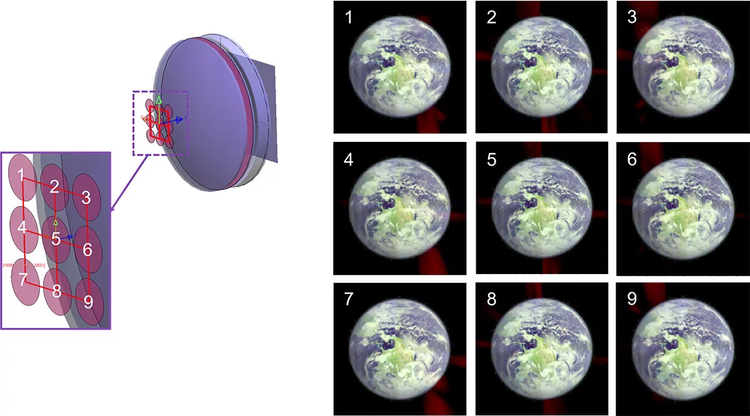
Figure 6. Simulated performance of pancake VR system at various positions in eyebox.
LightTools simulations provide quantitative results, showing luminance variation and true color outputs. The software also identifies and helps remove stray light, optimizing the overall system performance.
Waveguide AR design
Waveguide AR overview
Waveguide AR designs reduce the weight and size of the optical system by using gratings as input and output couplers. These waveguides align the virtual image with the real scene, creating a seamless augmented reality experience.
Keysight offers a full modelling solution for waveguide AR optical systems. Our design flow includes using RSoft tools DiffractMOD RCWA and FullWAVE FDTD to design coupling gratings, calculating bidirectional scattering diffraction data, or BSDF, files with a RSoft utility, and loading multiple variable BSDF files in LightTools to model the whole optical system.

Figure 7. A waveguide AR design flow that uses RSoft tools and LightTools
Types of gratings used in waveguide AR designs
- Surface relief gratings (SRG): Surface relief gratings are commonly used for AR glasses. SRG are tapered, slanted grooves etched on a substrate which can give high first order transmission at certain vertical depths. After optimization, we can find the best field of view (FOV) of grating dimension configurations for RGB light.

Figure 8. Surface relief gratings (SRG)
- Holographic volume gratings (HVG): Created using holographic recording methods, these gratings record interference patterns with two beams. They offer moderate index modulation and limited FOV.

Figure 9. Holographic volume gratings (HVG)
- Polarization volume gratings (PVG): Based on liquid crystal materials, PVGs provide high first-order diffraction efficiency with circular polarized input light. They offer high index contrast and a larger field of view compared to other gratings. Implementation in the RSoft CAD Environment involves specifying crystal axis rotation for single-layer PVGs or using a scripting approach for more complex structures.

Figure 10. Polarization volume gratings (PVG)
Modeling the AR glasses system layout in LightTools
Next, model the waveguide AR system in LightTools. In LightTools, the SRG AR glasses system layout (Figure 12) includes loading a single parametric BSDF file for an in-coupling grating and an out-coupling grating. The system specifications and layout are optimized to enhance uniformity and performance.

Figure 11. SRG AR glasses system layout in LightTools.
For HVG gratings, a simple full color test bench is set up in LightTools, as shown in Figure 13. HVG AR glasses simulations also demonstrate significant improvements after optimization.

Figure 12. HVG AR glasses system simulation test bench in LightTools.
Conclusion
Extended reality is a transformative technology with diverse applications across multiple industries. Combiner optics play a crucial role in presenting digital images to users, overlaying them with the physical world.
Keysight Optical Design Engineering provides advanced software tools, including CODE V, LightTools, and RSoft, to accurately model and optimize XR systems. By leveraging these tools, designers can create brilliant XR glasses and other devices that offer immersive and comfortable user experiences.